
HyNote
AI note taker that turns meetings, audio, PDFs, and videos into summaries and action items.
Data verified Sep 11, 2026
Score
- Try it free
- Free plan
- Best for
- Meeting-heavy professionals
Editorial Verdict
AI-researched, not hands-on testedCombining audio, PDFs, images, and web content into one searchable, chat-able workspace with bot-free meeting capture is HyNote's real differentiator. Speaker labeling slips when people talk over each other, free recording minutes run out quickly, and billing has drawn complaints about unexpected or double charges.
Reviewed by AIToolPundit Editorial Team · last verified October 2026
About HyNote
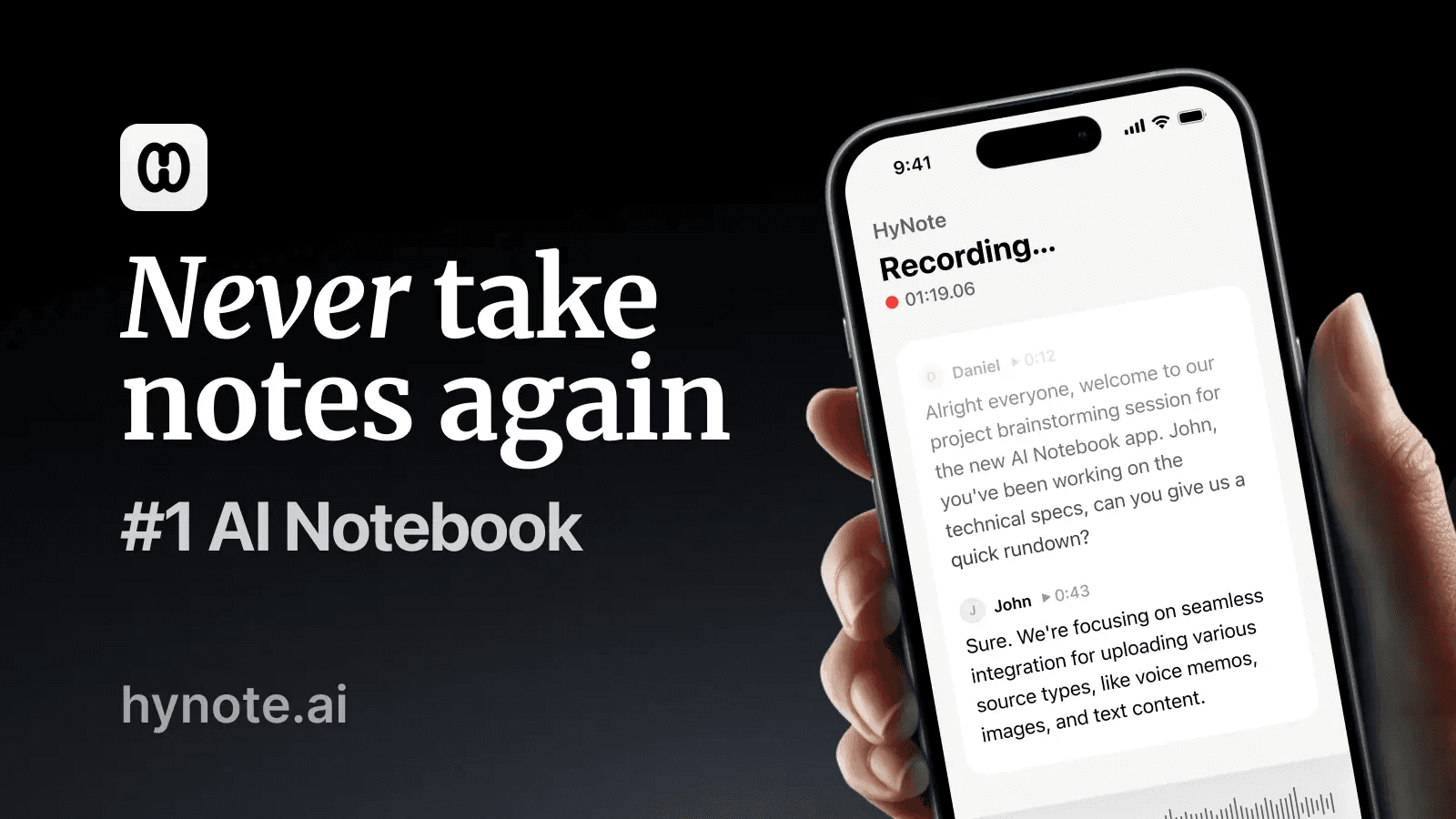
HyNote is an AI note-taking app that records or ingests eight input types—live meetings, uploaded audio/video, PDFs, images (OCR), YouTube links, web pages, and phone calls—then transcribes, summarizes, and extracts action items in seconds across 50+ languages. It's aimed at meeting-heavy professionals, students, and regulated teams in healthcare, legal, and finance, with encrypted, compliance-ready storage. Its main differentiator is bot-free capture from Zoom, Google Meet, Teams, and Webex combined with a single multimodal workspace you can chat with (RAG).
Screenshots
Commonly Cited Strengths & Limitations
Strengths
- Accurate transcripts on clean, single-speaker audio
- Clear, useful summaries and key points
- Handy 'chat with your notes' feature
- Combines audio, PDFs, images, videos, and web content into one organized workspace
- Bot-free meeting capture across major platforms
Limitations
- Speaker labeling slips when people talk over each other
- Struggles with overlapping speakers, heavy accents, low-quality phone audio, and dense technical jargon
- Templates and customization feel limited for business outputs
- Free allowance and recording minutes run out fast
- Poor billing and refund experience, including reports of unexpected or double charges
- Free trial forces users to end it and be charged for full access
- Weak iOS share extension
- Customer support and troubleshooting hard to reach
- Some video/TED links return only general descriptions instead of full transcription
Common Use Cases
- Transcribing and summarizing Zoom, Google Meet, Teams, and Webex meetings without a bot
- Extracting action items and meeting minutes from calls
- Summarizing PDFs, videos, and YouTube links
- Converting recorded audio and phone calls into searchable notes
- Chatting with transcripts and documents to find answers
- Keeping notes for regulated healthcare, legal, and finance workflows
Details
- Pricing Model
- Freemium
- Team Size
- Small Business, Enterprise
- Category
- AI Voice & Audio
Who is HyNote for?
Meeting-heavy professionals
Record client and team calls bot-free, then get summaries and action items to share to Google Docs or Notion.
Students
Turn lectures, YouTube videos, and PDFs into study notes and searchable summaries across 50+ languages.
Healthcare, legal, and finance teams
Handle sensitive meetings and documents with AES-256 encryption, SOC 2 Type II infrastructure, and HIPAA-aligned workflows.
Frequently Asked Questions
Is HyNote free?
HyNote offers a free plan.
Does HyNote offer a free trial?
Yes, HyNote offers a free trial.
Does HyNote have an API?
HyNote does not currently offer a public API.
What does HyNote integrate with?
HyNote integrates with Zoom, Google Meet, Microsoft Teams, Webex, Google Docs, Notion, Google Calendar, Apple Calendar, and more.
Is HyNote cloud-based or self-hosted?
HyNote is offered as a cloud-based (SaaS) deployment.
What are the downsides of HyNote?
Speaker labeling slips when people talk over each other Also, Struggles with overlapping speakers, heavy accents, low-quality phone audio, and dense technical jargon
Who is HyNote best for?
HyNote is best suited for Meeting-heavy professionals, Students, Healthcare, legal, and finance teams.
What can I use HyNote for?
Common uses for HyNote include transcribing and summarizing zoom, google meet, teams, and webex meetings without a bot, extracting action items and meeting minutes from calls, summarizing pdfs, videos, and youtube links, converting recorded audio and phone calls into searchable notes.
How does HyNote compare to Synthflow AI?
HyNote and Synthflow AI are both used for ai voice & audio -- specifically meeting & transcription tools. See the full side-by-side comparison for pricing and feature differences.
Key Features
- Instant summarizationAbstractive AI reads full transcripts or documents to produce summaries, key points, action items, and meeting minutes using 30+ professional templates (SWOT, interviews, study notes, follow-ups).
- Meeting transcriptionTranscribes Zoom, Meet, Teams, and Webex live or from a recording without a meeting bot, with speaker labels and timestamps in 50+ languages.
- Multimodal input supportCaptures from eight input types—live/uploaded audio and video, PDFs, image OCR, YouTube links, web pages, and phone calls—in one workflow.
- Audio-to-text conversionConverts recordings and uploads into searchable transcripts with speaker ID and timestamps, then generates an instant AI summary you can chat with (RAG).
- Export and syncOne-click export to Google Docs, Notion, PDF, or TXT, plus share-sheet sharing and Google/Apple Calendar sync.
- Secure storage & complianceAES-256 at rest, TLS 1.3 in transit, SOC 2 Type II infrastructure, and 2FA, SSO, and audit logging for teams.
- Cross-device syncReal-time sync across web, iPhone, Android, iPad, Apple Watch, and Chrome.
- Free local Mac transcriptionHyNote for Mac offers free, unlimited, 100% private on-device transcription.
Integrations
Technical Details
- Deployment
- Cloud
- Target Market
- Both
- Free Trial
- Yes
- Free Plan
- Available
Security & Compliance
Real Pricing from Verified Users
See what people actually pay for HyNote
Reviews
0 reviews
No reviews yet. Be the first to share your experience!
Switching Stories
Real migration experiences with HyNote
Discussion
Ask questions, share tips, or discuss this tool with other users.
No discussion yet. Start the conversation!
Similar tools in AI Voice & Audio
Other listed tools in AI Voice & Audio, not reviewed as direct alternatives

End-to-end Voice AI platform with in-house telephony for automated business phone calls.
Also Meeting & Transcription Tools
- BELL Framework
- Multi-Agent System
- Custom Telephony
AI-powered search engine that mines filings and earnings transcripts for investment insights.
Also Document Processing Tools
- Document Search
- Document Alerts & Filing Screener
- Trending Topics & Sentiment Analysis

- Free AI music generator
- 10 free songs daily
- Granular creation controls
AI dubbing and localization with a full editor to transcribe, translate, caption, and dub in 50+ languages.
Also Voice & Speech Tools
- Automated dubbing
- Transcription
- Translation
- Meeting Transcription & Recording
- Speaker Recognition
- Auto-Language Detection

- Browser extensions
- Mobile and desktop apps
- Reads AI chat answers
Also used for
People Also Viewed


More in AI Voice & Audio
AI voice & audio generation
AI noise cancellation and meeting notes that work across any calling app.

Build and deploy voice AI agents that handle phone calls at enterprise scale