
ImageCollage
Free browser-based photo collage maker with annotation tools
Data verified Nov 14, 2026
Score
- Price
- Free
- Try it free
- Free plan
- Best for
- Content creators
- Platforms
- Web
Editorial Verdict
AI-researched, not hands-on testedImageCollage is a free, browser-only collage and image-stitching tool with text, arrow, and shape annotations and presets for common social cover formats. It suits creators and casual users who want a no-login workflow where, according to the site, images are processed locally in the browser. The main limitations are that it is web-only, with no API or team features mentioned. PhotoCollage is an open-source desktop alternative; the commercial ones add templates and stock content.
Reviewed by AIToolPundit Editorial Team · last verified November 2026
About ImageCollage
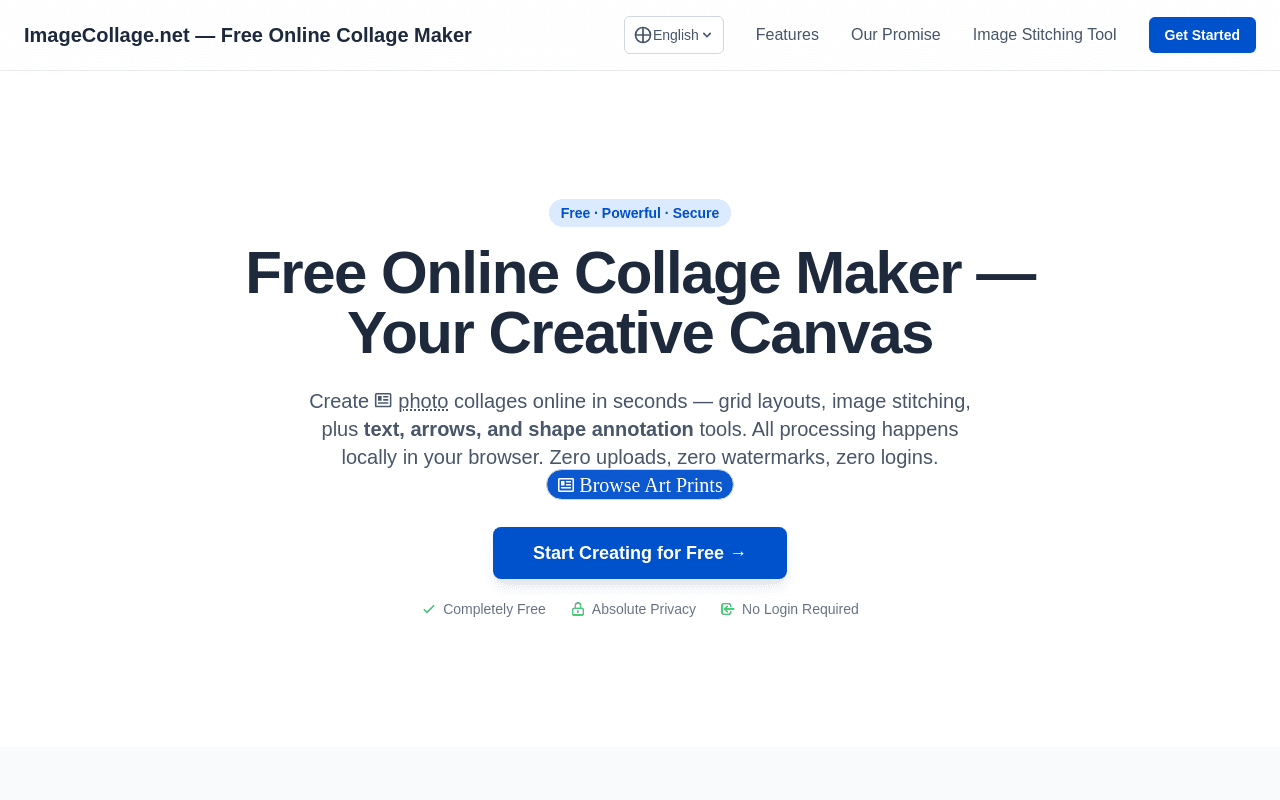
ImageCollage is a free online collage maker that runs entirely in the browser. It offers grid photo collage layouts for 2 to 16 images, long image stitching in horizontal or vertical directions, and built-in annotation tools including text, arrows, rectangles, and circles that work in both layout and stitching modes. Users can drag dividers to adjust cell sizes, swap image positions, zoom and pan images, and sort stitched images by dragging.
All image processing happens locally in the browser, so photos are not uploaded or stored on any server. There is no registration or login, no watermark on exports, and no usage limits stated on the page. The tool includes scene-specific presets for YouTube thumbnails, Instagram Reel covers, TikTok covers, Pinterest Pins, blog covers, before-and-after images, product comparisons, and tutorial images.
Screenshots
Commonly Cited Strengths & Limitations
Strengths
- No login, no watermark, and no stated usage limits
- Images are processed locally in the browser, not uploaded
- Combines grid collage, long stitching, and annotation in one tool
Limitations
- No desktop app, mobile app, or API is mentioned on the site
- No team or collaboration features are mentioned
- No source code link is shown on the site
Common Use Cases
- Creating YouTube, TikTok, Instagram Reel, and Pinterest Pin cover images
- Stitching long screenshots or chat histories with annotations
- Building before-and-after and product comparison images for blogs
Details
- Pricing Model
- Free
- Starting Price
- Free
- Platforms
- Web
- Category
- Design & Creative
Who is ImageCollage for?
Content creators
People making YouTube, TikTok, Instagram, and Pinterest cover images who need presets and quick annotations.
Everyday users
Users stitching chat logs, screenshots, or travel photos who want a privacy-respecting tool with no sign-up.
Frequently Asked Questions
Is ImageCollage free?
Yes, ImageCollage is free to use.
Does ImageCollage have an API?
ImageCollage does not currently offer a public API.
What platforms does ImageCollage support?
ImageCollage is available on Web.
What are the downsides of ImageCollage?
No desktop app, mobile app, or API is mentioned on the site Also, No team or collaboration features are mentioned
Who is ImageCollage best for?
ImageCollage is best suited for Content creators, Everyday users.
What can I use ImageCollage for?
Common uses for ImageCollage include creating youtube, tiktok, instagram reel, and pinterest pin cover images, stitching long screenshots or chat histories with annotations, building before-and-after and product comparison images for blogs.
What is the best alternative to ImageCollage?
Our reviewed alternatives to ImageCollage are Canva, Fotor, BeFunky, PicCollage, FotoJet and Adobe Express.
How does ImageCollage compare to InfiniteArt.ai?
ImageCollage and InfiniteArt.ai are both used for design & creative -- specifically photo editing tools. See the full side-by-side comparison for pricing and feature differences.
Key Features
- Grid photo collage layoutsTemplates for 2 to 16 images with drag-adjustable dividers, image swapping, and Alt-hold panning for composition.
- Long image stitchingStitch multiple images into one long picture horizontally or vertically, with drag sorting to reorder them on the canvas.
- Canvas annotation toolsAdd text, arrows, rectangles, and circles on the canvas, with free dragging, 8-way scaling on shapes, and color and thickness controls on arrows.
- Image zoom and panZoom images with the mouse wheel, pinch gestures, or buttons, and fine-tune positions with the keyboard arrows.
- Local in-browser processingAll image processing happens locally in the browser; the site states it does not upload or store user images.
- Scene-specific presetsPreset canvas shapes for YouTube thumbnails, Instagram Reel covers, TikTok covers, Pinterest Pins, blog covers, before-and-after images, product comparisons, and tutorials.
Technical Details
- Free Plan
- Available
Official Pricing
ImageCollage's published plans · verified Nov 14, 2026
Free
$0
- Grid collage layouts for 2–16 images
- Long image stitching
- Text, arrow, and shape annotations
- HD watermark-free export
Pricing shown above is sourced from ImageCollage's own published plans as of Nov 14, 2026 and can change at any time -- confirm current pricing on ImageCollage's own site before purchasing.
Real Pricing from Verified Users
See what people actually pay for ImageCollage
Reviews
0 reviews
No reviews yet. Be the first to share your experience!
Switching Stories
Real migration experiences with ImageCollage
Discussion
Ask questions, share tips, or discuss this tool with other users.
No discussion yet. Start the conversation!
ImageCollage alternatives we reviewed
Reviewed when this listing was published; open-source options are marked.
Canva
Online design tool with collage templates and social media presets.
Fotor
Online photo editor and collage maker with templates.
BeFunky
Online collage maker and photo editor with layout templates.
PicCollage
Collage maker across web and mobile with templates and stickers.
FotoJet
Online collage maker, designer, and photo editor.
Adobe Express
Online design tool with collage, social presets, and annotations.
Similar tools in Design & Creative
Other listed tools in Design & Creative, not reviewed as direct alternatives

AI creative studio for iOS and Mac that turns text into images and animates them into video.
Also Photo Editing Tools
- Text-to-image generation
- Generate videos
- Multiple image models
- Raya AI agent
- Competitor strategy extraction
- Customer review mining

- Generative Fill
- Generative Expand
- Generative Upscale

The all-in-one platform to grow and monetize newsletters, podcasts, and communities
Also Social Media Content Tools
- Newsletters
- Podcasts
- Digital Products

- AI Image Editor
- Photo Restoration
- AI Photo Packs / Training

AI photo restoration that brings old and blurry face photos back to life for free.
Also Photo Editing Tools
- AI photo restoration
People Also Viewed


More in Design & Creative
Collaborative interface design tool

The world's best image editing software