Audo AI
One-click AI audio cleaning that removes background noise and enhances speech in seconds.
Data verified Sep 9, 2026
Score
- Price
- $12/mo
- Try it free
- Free plan
- Best for
- Podcasters
Editorial Verdict
AI-researched, not hands-on testedOne-click, browser-based noise removal that preserves vocal quality well needs no audio-editing knowledge and works on any OS. Advanced controls like detailed EQ or customizable reverb reduction aren't available, and pushing reverb removal too hard can introduce its own artifacts.
Reviewed by AIToolPundit Editorial Team · last verified October 2026
About Audo AI
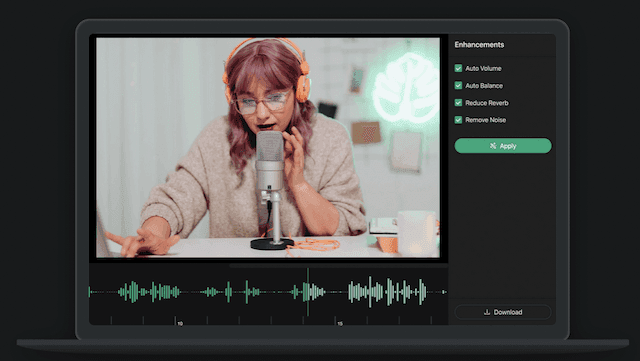
Audo AI (Audo Studio) is a browser-based audio enhancement tool that uses AI to remove background noise, reduce echo, and auto-level volume with a single click. It's built for podcasters, YouTubers, online course creators, and other voice-focused content creators who want clean audio without technical audio-editing skills. Its main differentiator is speed and simplicity — the vendor claims it cleans audio roughly 10x faster than Adobe or Audacity and works on any OS since it runs entirely in the browser.
Screenshots
Commonly Cited Strengths & Limitations
Strengths
- Very easy one-click operation requiring no audio editing knowledge
- Effective background noise removal that preserves vocal quality well
- Browser-based, so it works on any operating system with no install
- Fast processing, even on longer files
Limitations
- Limited advanced/granular controls (e.g. no detailed EQ or customizable reverb reduction)
- Can over-process or introduce artifacts on tough audio, especially when reverb removal is pushed too high
- Free plan is limited to a small number of minutes per month
- No plugin integration or built-in audio recording
Common Use Cases
- Cleaning up podcast recordings
- Enhancing audio for YouTube and video content
- Removing background noise from voice recordings
- Improving voiceovers and online course audio
Details
- Pricing Model
- Freemium
- Starting Price
- $12/mo
- Category
- AI Voice & Audio
Who is Audo AI for?
Podcasters
Clean up muffled voices and background noise so listeners get clear, professional-sounding episodes.
YouTubers & Video Creators
Improve the sound quality of videos, since audiences are less forgiving of poor audio than of camera or lighting issues.
Online Course Creators
Remove household and environmental noise from lesson recordings without needing a dedicated studio.
Frequently Asked Questions
Is Audo AI free?
Audo AI offers a free plan, with paid plans starting at $12/mo.
Does Audo AI have an API?
Yes, Audo AI provides an API for developers.
Is Audo AI cloud-based or self-hosted?
Audo AI is offered as a cloud-based (SaaS) deployment.
What are the downsides of Audo AI?
Limited advanced/granular controls (e.g. no detailed EQ or customizable reverb reduction) Also, Can over-process or introduce artifacts on tough audio, especially when reverb removal is pushed too high
Who is Audo AI best for?
Audo AI is best suited for Podcasters, YouTubers & Video Creators, Online Course Creators.
What can I use Audo AI for?
Common uses for Audo AI include cleaning up podcast recordings, enhancing audio for youtube and video content, removing background noise from voice recordings, improving voiceovers and online course audio.
What is the best alternative to Audo AI?
Our reviewed alternatives to Audo AI are Adobe Audition and Audacity.
How does Audo AI compare to Suno AI?
Audo AI and Suno AI are both used for ai voice & audio -- specifically voice & speech tools. See the full side-by-side comparison for pricing and feature differences.
Key Features
- Advanced Noise RemovalAutomatically removes background noise from recordings so you don't need a quiet space to record.
- Echo Reduction (Dereverberation)Automatically reduces reverb/echo in recordings; listed as coming soon.
- Auto VolumeAutomatically adjusts volume levels for a more pleasant, consistent sound.
- One-Click CleaningCleans and enhances audio with a single button press rather than manual editing.
- Developer APIAn API is offered for developers to integrate Audo's audio processing.
Technical Details
- Deployment
- Cloud
- Target Market
- B2C
- API
- Available
- Free Plan
- Available
Official Pricing
Audo AI's published plans · verified Sep 9, 2026
Starter
$0/mo
- Noise Removal
- Dereverberation (coming soon)
- Auto Volume
- 20 minutes of audio enhancement per month
Creator
$12/mo
- All available features
- 600 minutes of audio enhancement per month
- Discounted from $20 for a limited time
Pay As You Go
$20/one-time
- All available features
- 600 additional minutes on top of Starter or Creator monthly minutes
- Creator plan users pay $10 (50% discount)
Pricing shown above is sourced from Audo AI's own published plans as of Sep 9, 2026 and can change at any time -- confirm current pricing on Audo AI's own site before purchasing.
Full Audo AI pricing breakdown, free plan and cheaper alternatives →
Real Pricing from Verified Users
See what people actually pay for Audo AI
Reviews
0 reviews
No reviews yet. Be the first to share your experience!
Switching Stories
Real migration experiences with Audo AI
Discussion
Ask questions, share tips, or discuss this tool with other users.
No discussion yet. Start the conversation!
Audo AI alternatives we reviewed
Reviewed when this listing was published; open-source options are marked.
Adobe Audition
Professional audio editing software with noise reduction that Audo positions itself against.
Audacity
Free open-source audio editor with manual noise reduction tools.
Similar tools in AI Voice & Audio
Other listed tools in AI Voice & Audio, not reviewed as direct alternatives

- Free AI music generator
- 10 free songs daily
- Granular creation controls
AI dubbing and localization with a full editor to transcribe, translate, caption, and dub in 50+ languages.
Also Voice & Speech Tools
- Automated dubbing
- Transcription
- Translation

- Browser extensions
- Mobile and desktop apps
- Reads AI chat answers

- Video translation and dubbing
- Voice cloning
- Lip-sync
- AI Voice Generator (Text to Speech)
- All-in-one AI editor
- Music

- Text-based video editing
- Video transcription
- Remove filler words
Also used for
People Also Viewed




More in AI Voice & Audio
AI voice & audio generation

AI noise cancellation and meeting notes that work across any calling app.

Build and deploy voice AI agents that handle phone calls at enterprise scale