HeyPhoto
AI face editor to tweak gaze, age, gender, emotion, skin, hair and more on selfies and group photos
Data verified Oct 25, 2026
Score
- Price
- $19/mo
- Try it free
- Free plan
- Best for
- Social media users
About HeyPhoto
HeyPhoto is a free, browser-based AI face editor from Icons8 that detects faces in a photo and lets you naturally adjust features like gaze direction, smile intensity, apparent age, gender, and facial expression, with makeup, nose reshaping, and new hairstyles on the way. It's aimed at everyday consumers and social-media users who want quick, no-skill facial tweaks rather than a full pro editor, and it stands out for its one-click Anonymize tool that alters faces to evade facial-recognition systems. Uploads are capped at 5 MB with faces up to 1024×1024 px, and free results carry a watermark.
Screenshots
Commonly Cited Strengths & Limitations
Strengths
- Free to use
- Intuitive and requires no special skills
- Returns images of the same size and quality as the source
Limitations
- Puts a watermark on resulting photos
- Supports photos of up to 5 MB with faces up to 1024*1024 px
- Several features (skin tone, nose, reshape, makeup, hair) are not yet available
Common Use Cases
- Tune selfies and group photos with AI
- Change gaze direction, nose shape, skin tone, age, hair style and other facial features
- Anonymize faces to avoid face recognition
Details
- Pricing Model
- Free
- Starting Price
- $19/mo
- Category
- Design & Creative
Who is HeyPhoto for?
Social media users
Tweak selfies -- adjust smiles, gaze, and expressions -- for more flattering posts and profiles, including dating apps.
Privacy-conscious users
Use the Anonymizer to modify their face so it's harder for face-recognition systems to identify them.
Frequently Asked Questions
Is HeyPhoto free?
Yes, HeyPhoto is free to use.
Does HeyPhoto offer a free trial?
Yes, HeyPhoto offers a free trial of 3 days.
Does HeyPhoto have an API?
HeyPhoto does not currently offer a public API.
Is HeyPhoto cloud-based or self-hosted?
HeyPhoto is offered as a cloud-based (SaaS) deployment.
What are the downsides of HeyPhoto?
Puts a watermark on resulting photos Also, Supports photos of up to 5 MB with faces up to 1024*1024 px
Who is HeyPhoto best for?
HeyPhoto is best suited for Social media users, Privacy-conscious users.
What can I use HeyPhoto for?
Common uses for HeyPhoto include tune selfies and group photos with ai, change gaze direction, nose shape, skin tone, age, hair style and other facial features, anonymize faces to avoid face recognition.
What is the best alternative to HeyPhoto?
Our reviewed alternatives to HeyPhoto are Face Swapper (Icons8) and Face Generator (Icons8).
How does HeyPhoto compare to InfiniteArt.ai?
HeyPhoto and InfiniteArt.ai are both used for design & creative -- specifically photo editing tools. See the full side-by-side comparison for pricing and feature differences.
Key Features
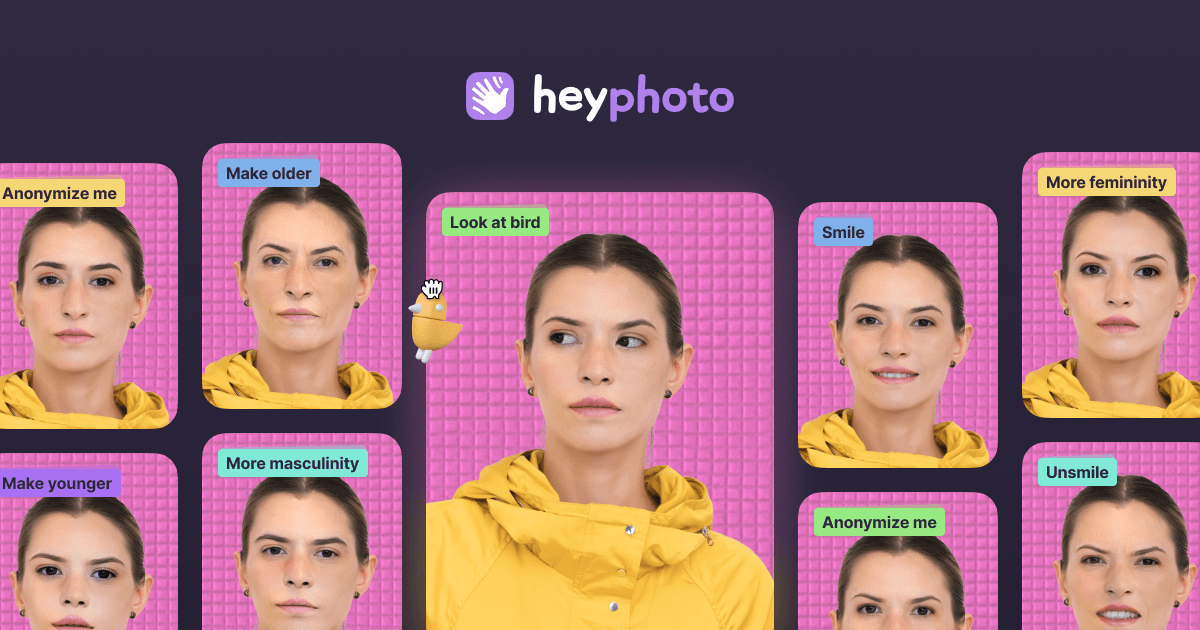
- Look at birdChange eye direction by dragging a bird around the image.
- Anonymize meKeep your identity private and become invisible to face recognition systems.
- Gimme a smileSet the required level of happiness in a face.
- Change genderMake a face appear more masculine or feminine.
- Change my ageMake yourself look older or younger.
- Tweak emotionsChange a facial expression to match any mood you want.
- Adjust skin toneGet the perfect skin tone (coming soon).
- Make new nosePlay around with nose shapes (coming soon).
- Reshape my faceGain or lose weight instantly without diets (coming soon).
- Add makeupApply eye shadows, eyeliner, and lipstick without brushes (coming soon).
- Try new hair stylesAlter your entire look with brand-new hair (coming soon).
Technical Details
- Deployment
- Cloud
- Target Market
- B2C
- Free Trial
- 3 days
- Free Plan
- Available
Support
Official Pricing
HeyPhoto's published plans · verified Oct 25, 2026
Free
$0
- Full face-editing tools
- Watermark on downloaded images
Monthly
$19/mo
- Watermark removal
- 3-day trial
Yearly
$99/yr
- Watermark removal
Pricing shown above is sourced from HeyPhoto's own published plans as of Oct 25, 2026 and can change at any time -- confirm current pricing on HeyPhoto's own site before purchasing.
Full HeyPhoto pricing breakdown, free plan and cheaper alternatives →
Real Pricing from Verified Users
See what people actually pay for HeyPhoto
Reviews
0 reviews
No reviews yet. Be the first to share your experience!
Switching Stories
Real migration experiences with HeyPhoto
Discussion
Ask questions, share tips, or discuss this tool with other users.
No discussion yet. Start the conversation!
HeyPhoto alternatives we reviewed
Reviewed when this listing was published; open-source options are marked.
Face Swapper (Icons8)
Icons8's high-resolution AI face-swapping tool.
Face Generator (Icons8)
Generates photorealistic AI faces from chosen parameters.
Similar tools in Design & Creative
Other listed tools in Design & Creative, not reviewed as direct alternatives

AI creative studio for iOS and Mac that turns text into images and animates them into video.
Also Photo Editing Tools
- Text-to-image generation
- Generate videos
- Multiple image models

- Generative Fill
- Generative Expand
- Generative Upscale

- AI Image Editor
- Photo Restoration
- AI Photo Packs / Training

AI photo restoration that brings old and blurry face photos back to life for free.
Also Photo Editing Tools
- AI photo restoration

All-in-one AI photo editor that removes image backgrounds automatically in seconds
Also Photo Editing Tools
- Background Remover
- AI Background
- AI Enhance

AI photo colorizer that adds realistic, lifelike color to black-and-white images in seconds
Also Photo Editing Tools
- 21+ color filters
- Customize the colors
- Batch upload
Also used for
People Also Viewed


More in Design & Creative

Collaborative interface design tool

The world's best image editing software