Read
AI meeting assistant that turns meetings into summaries, action items, and next-step decisions
Data verified Oct 12, 2026
Score
Editorial Verdict
AI-researched, not hands-on testedRead's strength is that it works across Zoom, Google Meet and Teams and turns a meeting into a summary, action items and searchable answers, so one tool covers a mixed-platform team. The catch is consent and data control: reviewers report that it can join meetings through calendar access without participants clearly agreeing, and that deleting recorded meeting data is hard. Use it where you control the calendar settings and can tell attendees up front; skip it if your meetings include clients or guests who have not agreed to a recording bot.
Reviewed by AIToolPundit Editorial Team · last verified October 2026
About Read
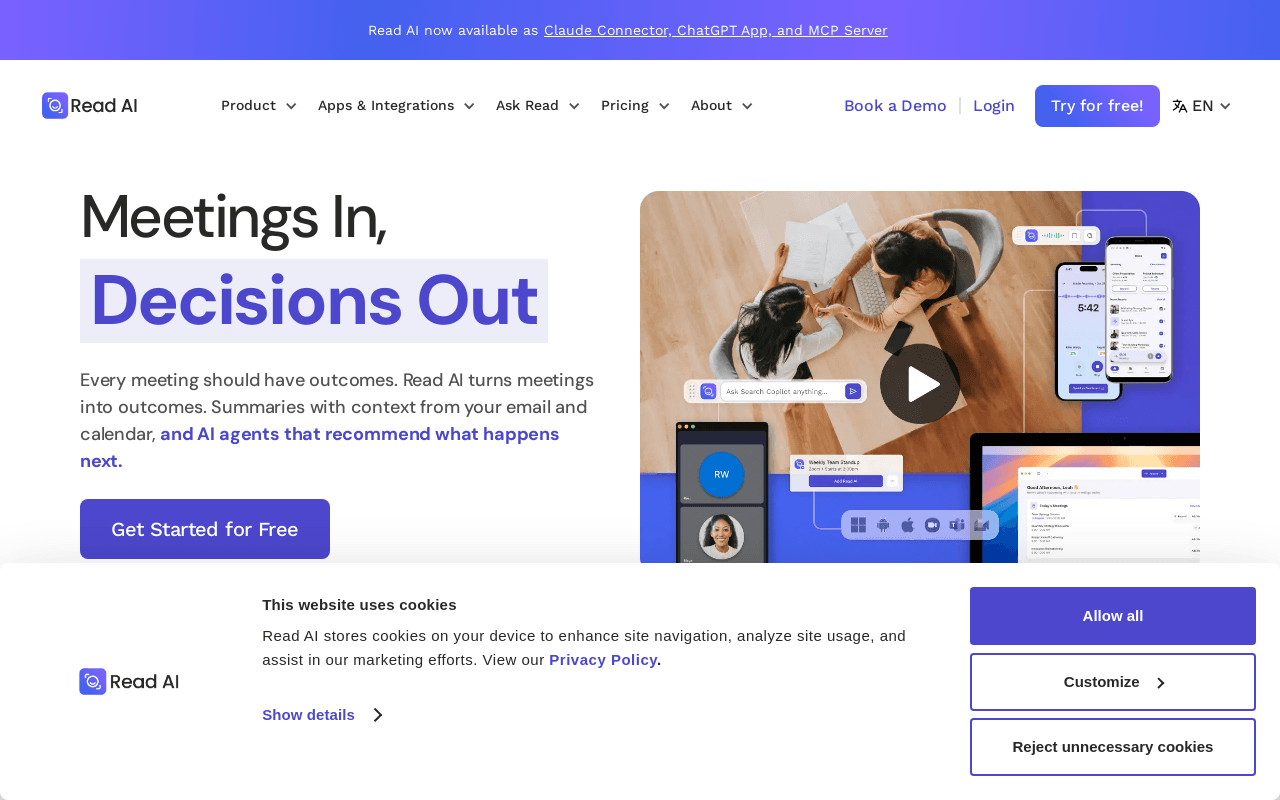
Read AI is an AI meeting assistant that records, transcribes, and summarizes meetings across Zoom, Google Meet, and Microsoft Teams, then pulls in context from your email, calendar, past meetings, and CRM to auto-generate recaps, action items, and highlights tailored to each attendee. Built for professionals and teams who want meeting outcomes routed into the tools they already use, it adds an 'Ask Read' search layer and a digital-twin assistant (Ada) that answers what was decided and who owns it, with citations. It's platform-agnostic and works across meetings, email, and messaging rather than being tied to a single conferencing tool.
Screenshots
Commonly Cited Strengths & Limitations
Strengths
- Automatically records and transcribes meetings, improving documentation and accessibility
- Learns individual users and adapts to their style
- Saves time on note-taking during the workday
Limitations
- Reportedly auto-joins meetings and hooks into calendars without clear consent from participants
- Widely criticized as invasive, with many one-star reviews on Trustpilot calling it malware-like
- Users report difficulty deleting their recorded meeting data
Details
- Pricing Model
- Freemium
- Platforms
- WebZoomGoogle MeetMicrosoft Teams
- Category
- Analytics & BI
Who is Read for?
Team Leads and Managers
Use auto-generated action items and 'Ask Read' with citations to track what was promised, who owns it, and what's still open.
Sales Teams
Pull CRM context into meeting summaries and route follow-ups into the tools they already work in.
Busy Professionals
Rely on the Ada digital twin and tailored recaps to offload note-taking and email busywork.
Frequently Asked Questions
Does Read have an API?
Read does not currently offer a public API.
What platforms does Read support?
Read is available on Web, Zoom, Google Meet, Microsoft Teams.
What are the downsides of Read?
Reportedly auto-joins meetings and hooks into calendars without clear consent from participants Also, Widely criticized as invasive, with many one-star reviews on Trustpilot calling it malware-like
Who is Read best for?
Read is best suited for Team Leads and Managers, Sales Teams, Busy Professionals.
What is the best alternative to Read?
Our reviewed alternatives to Read are Meetily, WhisperX, Fireflies.ai and Otter.ai. Open-source options: Meetily, WhisperX.
How does Read compare to Fireflies AI?
Read and Fireflies AI are both used for analytics & bi -- specifically meeting & transcription tools. See the full side-by-side comparison for pricing and feature differences.
Key Features
- Meeting NotesAI-generated meeting notes, transcripts, and video recordings.
- AI AgentAn AI agent can attend and summarize meetings so live attendance is optional.
- Ask Read AIAnswers questions from meetings, emails, and messages with citations.
- Mobile AppCaptures in-person meetings via iOS and Android apps.
- Meeting summariesAutomatically generates recaps of meetings.
- Action itemsAuto-generated action items routed to the tools your team already uses.
- HighlightsCreates AI-generated highlight clips from meetings.
- PlaybackLets meetings be played back after they occur.
Technical Details
Real Pricing from Verified Users
See what people actually pay for Read
Reviews
0 reviews
No reviews yet. Be the first to share your experience!
Switching Stories
Real migration experiences with Read
Discussion
Ask questions, share tips, or discuss this tool with other users.
No discussion yet. Start the conversation!
Read alternatives we reviewed
Reviewed when this listing was published; open-source options are marked.
Meetily
Open sourcePrivacy-first AI meeting assistant with live transcription
WhisperX
Open sourceASR with word-level timestamps and diarization
Fireflies.ai
AI meeting notetaker
Otter.ai
AI meeting transcription and notes
Similar tools in Analytics & BI
Other listed tools in Analytics & BI, not reviewed as direct alternatives

- Meeting Transcription & Recording
- Speaker Recognition
- Auto-Language Detection
All-in-one AI knowledge workspace for deeper thinking, not just faster answers
Also Knowledge Management Tools
- Ponder Agent
- Infinite canvas / knowledge mapping
- Multi-source import

AI creative agents that turn one brief into on-brand images, video, copy, slides, and audio
Also AI Agent Platforms
- AI Agent
- Brand consistency
- Smart Model Routing
AI sales coaching and meeting intelligence that records calls, updates your CRM, and drafts follow-ups.
Also Meeting & Transcription Tools
- Omnichannel call capture
- AI summary & transcription
- Automatic CRM updates

- Gong Revenue AI OS
- Gong Engage
- Gong Forecast
- Chat
- Video meetings
- Meeting recordings & transcripts
Also used for
People Also Viewed


More in Analytics & BI
Cloud monitoring & security platform

Digital experience analytics & session replay


Powerful business intelligence platform