
Rokoko
Wearable motion capture suits, gloves, and face tools that turn real movement into 3D animation
Data verified Nov 3, 2026
Score
- Try it free
- Free trial (30 days)
- Best for
- Indie animators
About Rokoko
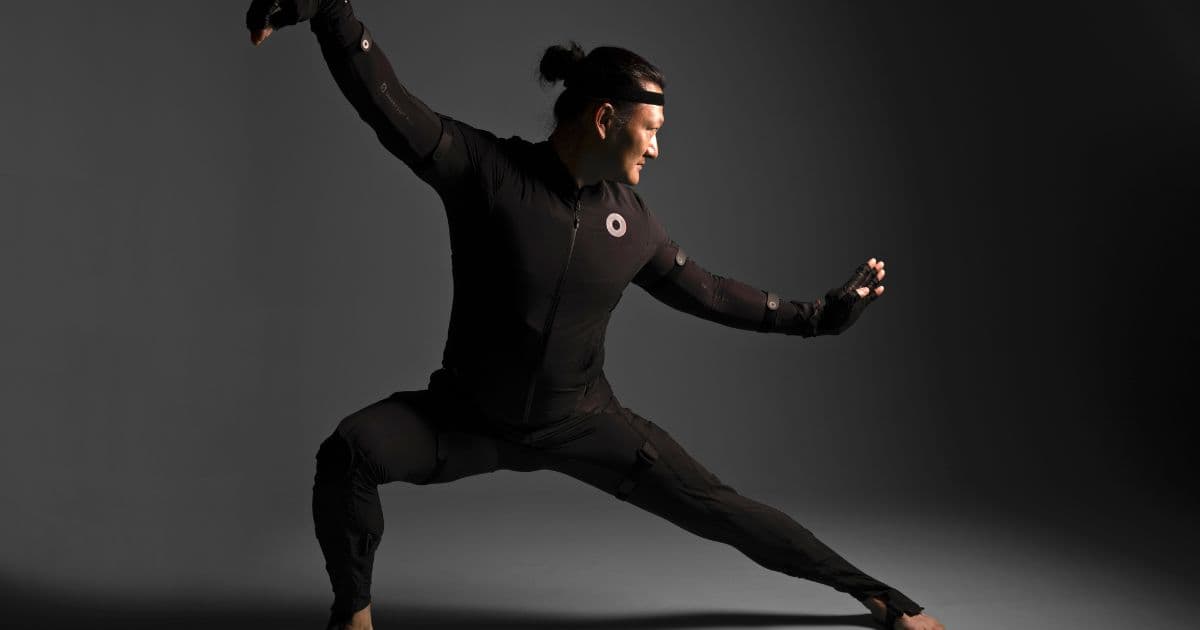
Rokoko is a motion capture system built around wearable hardware — the Smartsuit Pro II body suit, Smartgloves, Coil Pro, and Face Capture — paired with Rokoko Studio software for recording, cleanup, retargeting, and real-time livestreaming. It's aimed at 3D creators from indie animators and filmmakers to full-scale studios, educators, and researchers working in gaming, film, and animation. Its main draw is camera-free, subscription-free full-performance capture with unlimited recordings that streams and exports directly into tools like Blender, Unreal Engine, Maya, and Unity.
Screenshots
Commonly Cited Strengths & Limitations
Strengths
- Sets up in minutes with no cameras needed
- No limits on recordings with takes stored automatically
- Drift-free motion capture precision
- Worldwide tracked delivery with buy now, pay later options (USA & EU)
- Dedicated support team
Limitations
- Accuracy is lower than optical mocap systems and IMU drift can occur over time
- Requires a full 3D pipeline (rigged character, editor, renderer) to turn captures into deliverables, so non-technical users struggle
- Complex motions with occlusion, fast movement, ground contact, or interacting limbs often need cleanup
- WiFi connection to a PC sometimes requires disabling the firewall
Common Use Cases
- Motion capture
- Data collection
- Robotics
- Gaming
- Film
- Animation
- Character animation
Details
- Pricing Model
- Paid
- Founded
- 2014
- Team Size
- Freelancers, Small Business, Enterprise
- Headquarters
- Copenhagen, Denmark
- Category
- Design & Creative
Who is Rokoko for?
Indie animators
Use Rokoko's affordable mocap gear to animate characters quickly for their own projects.
Studios
Rely on Rokoko mocap tools in full-scale professional production pipelines.
Researchers and engineers
Use Rokoko devices for motion capture and data collection, including robotics work.
Educators
Use Rokoko tools in academic and educational settings, with volume and education discounts available.
Frequently Asked Questions
Does Rokoko offer a free trial?
Yes, Rokoko offers a free trial of 30 days.
Does Rokoko have an API?
Yes, Rokoko provides an API for developers.
What does Rokoko integrate with?
Rokoko integrates with Unity, Reallusion, Unreal Engine, Houdini, Maya, Cinema 4D, Blender, Cartoon Animator 4, and more.
Is Rokoko cloud-based or self-hosted?
Rokoko is offered as a cloud-based (SaaS) deployment.
What are the downsides of Rokoko?
Accuracy is lower than optical mocap systems and IMU drift can occur over time Also, Requires a full 3D pipeline (rigged character, editor, renderer) to turn captures into deliverables, so non-technical users struggle
Who is Rokoko best for?
Rokoko is best suited for Indie animators, Studios, Researchers and engineers.
What can I use Rokoko for?
Common uses for Rokoko include motion capture, data collection, robotics, gaming.
What is the best alternative to Rokoko?
Our reviewed alternatives to Rokoko are Xsens.
How does Rokoko compare to InfiniteArt.ai?
Rokoko and InfiniteArt.ai are both used for design & creative -- specifically video editing tools. See the full side-by-side comparison for pricing and feature differences.
Key Features
- Smartsuit Pro IIWireless mocap suit designed for full-body motion capture.
- Smartgloves IIMotion capture gloves for precise finger motion tracking.
- Face CaptureHigh-quality face capture tools for iOS and Android workflows.
- Coil ProDelivers drift-free motion capture precision.
- Full performance capture bundleCombines Smartsuit Pro II, Smartgloves II and Face Capture for full body motion capture.
- Rokoko StudioStores takes automatically and lets you correct footlocks, smooth motions and retarget to custom characters.
- Export optionsExport with custom framerate, file type (FBX, BVH, CSV) and skeleton (Newton, HIK, UE5).
- LivestreamingStream in realtime directly into 3D tools via plugins for Unreal, Unity, Blender, Maya and iClone.
Integrations
Technical Details
- Deployment
- Cloud
- Target Market
- Both
- API
- Available
- Free Trial
- 30 days
Support
Real Pricing from Verified Users
See what people actually pay for Rokoko
Reviews
0 reviews
No reviews yet. Be the first to share your experience!
Switching Stories
Real migration experiences with Rokoko
Discussion
Ask questions, share tips, or discuss this tool with other users.
No discussion yet. Start the conversation!
Rokoko alternatives we reviewed
Reviewed when this listing was published; open-source options are marked.
Xsens
Higher-end inertial motion capture system often compared with Rokoko.
Similar tools in Design & Creative
Other listed tools in Design & Creative, not reviewed as direct alternatives

AI creative studio for iOS and Mac that turns text into images and animates them into video.
Also Video Editing Tools
- Text-to-image generation
- Generate videos
- Multiple image models
AI dubbing and localization with a full editor to transcribe, translate, caption, and dub in 50+ languages.
Also Video Editing Tools
- Automated dubbing
- Transcription
- Translation

- Seedance 2.5
- Nano Banana Pro
- Higgsfield Genjutsu

AI creative agents that turn one brief into on-brand images, video, copy, slides, and audio
Also Video Editing Tools
- AI Agent
- Brand consistency
- Smart Model Routing

- Video translation and dubbing
- Voice cloning
- Lip-sync

- ClipAnything
- ReframeAnything
- AI captioning
Also used for
People Also Viewed


More in Design & Creative
Collaborative interface design tool

The world's best image editing software