
SnapEdit
All-in-one AI photo editor to remove objects, backgrounds, and text from photos online.
Data verified Sep 18, 2026
Score
- Try it free
- Free plan
- Best for
- Content Creators
About SnapEdit
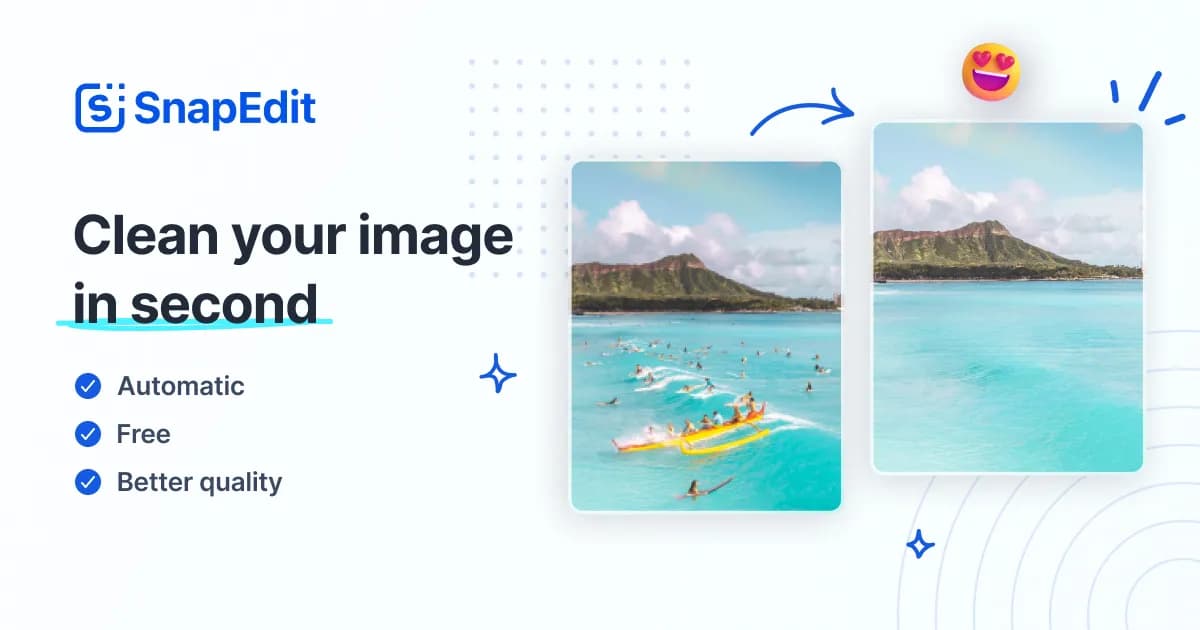
SnapEdit is a web and mobile AI photo editor that removes unwanted objects, backgrounds, text overlays, and wirelines, enhances blurry images to HD/4K, retouches skin, and restores old photos. It's built for content creators, ecommerce and marketing teams, product photographers, and everyday users who want fast one-touch edits without installing desktop software. Its main differentiator is combining a full set of AI editing tools plus batch processing of up to 50 photos and API integration in a single online workspace.
Screenshots
Commonly Cited Strengths & Limitations
Strengths
- Effective one-click object and background removal
- Easy to use for both beginners and professionals
- Precise background edits and noticeable quality improvements
Limitations
- Object cleanup is imperfect on detailed backgrounds or objects close to other elements, leaving blurry spots that need manual fixes
- Free plan credits run out quickly, pushing users toward upgrading
- Billing and subscription issues, including hard-to-cancel plans and poor refund responses
- Mobile app may not recognize pro status, showing ads and upgrade pop-ups even to paying users
- Aggressive upsells and gating of some features to mobile only
- Clunky, inefficient interface that requires switching tools/canvases one at a time
- Reports of the app freezing or failing to load photo galleries
Common Use Cases
- Removing unwanted objects and photobombers from photos
- Creating and prepping social media content for Instagram, TikTok, and YouTube
- Editing and standardizing product photos at scale for ecommerce marketplaces
- Removing and replacing backgrounds for product and portrait shots
- Enhancing and fixing blurry everyday photos
- Restoring old photos to preserve memories
- Automating image editing in apps via API integration
Details
- Pricing Model
- Freemium
- Category
- Design & Creative
Who is SnapEdit for?
Content Creators
Remove distractions, generate new looks, and enhance images to prepare content for Instagram, TikTok, YouTube, and blogs.
Ecommerce & Marketing Teams
Batch process up to 50 product photos, remove backgrounds, compress files, and automate editing via API for marketplaces.
Product Photographers
Remove objects and precisely edit backgrounds to produce clean, standardized product images.
Everyday Users
Fix blurry photos and remove unwanted elements with one-click tools that require no software installation.
Frequently Asked Questions
Is SnapEdit free?
SnapEdit offers a free plan.
Does SnapEdit have an API?
Yes, SnapEdit provides an API for developers.
Is SnapEdit cloud-based or self-hosted?
SnapEdit is offered as a cloud-based (SaaS) deployment.
What are the downsides of SnapEdit?
Object cleanup is imperfect on detailed backgrounds or objects close to other elements, leaving blurry spots that need manual fixes Also, Free plan credits run out quickly, pushing users toward upgrading
Who is SnapEdit best for?
SnapEdit is best suited for Content Creators, Ecommerce & Marketing Teams, Product Photographers.
What can I use SnapEdit for?
Common uses for SnapEdit include removing unwanted objects and photobombers from photos, creating and prepping social media content for instagram, tiktok, and youtube, editing and standardizing product photos at scale for ecommerce marketplaces, removing and replacing backgrounds for product and portrait shots.
How does SnapEdit compare to InfiniteArt.ai?
SnapEdit and InfiniteArt.ai are both used for design & creative -- specifically photo editing tools. See the full side-by-side comparison for pricing and feature differences.
Key Features
- Remove ObjectOne-touch AI detects and removes unwanted objects and details from photos.
- Remove BackgroundAutomatically erases photo backgrounds and offers 100+ templates to replace them.
- Enhance PhotoAutomatically boosts resolution and overall quality of blurry photos.
- Remove TextDetects and removes text overlays, timestamps, and captions from images.
- Remove Wire lineRemoves electric wires and wirelines that photobomb photos.
- AI SkinRetouches skin by removing acne and blemishes for a glowing look.
- WatermarkHandles watermarks on images as part of the editing toolset.
- Convert ImageConverts images between formats.
- Compress ImageOptimizes and reduces image file size.
- Blur BackgroundBlurs the background of a photo.
- Batch processingProcesses up to 50 photos at once for high-volume workflows.
- Photo restoration and upscalingRestores and upscales photo quality, including old photos.
Technical Details
- Deployment
- Cloud
- Target Market
- Both
- API
- Available
- Free Plan
- Available
Support
Real Pricing from Verified Users
See what people actually pay for SnapEdit
Reviews
0 reviews
No reviews yet. Be the first to share your experience!
Switching Stories
Real migration experiences with SnapEdit
Discussion
Ask questions, share tips, or discuss this tool with other users.
No discussion yet. Start the conversation!
Similar tools in Design & Creative
Other listed tools in Design & Creative, not reviewed as direct alternatives

AI creative studio for iOS and Mac that turns text into images and animates them into video.
Also Photo Editing Tools
- Text-to-image generation
- Generate videos
- Multiple image models
AI headshot generator that turns your selfies into professional headshots in under 90 minutes.
Also Photo Editing Tools
- AI Headshot Generation
- AI Virtual Try-On
- Reprocessing
All-in-one browser AI platform for generating images, video, music, voice chat, and more.
Also Photo Editing Tools
- AI Image Generator
- AI Video Generator
- AI Music Generator
AI-first design platform with vector tools, templates, mockups and brand kits
Also graphic-design-tools
- AI generation
- Editing tools
- Infinite canvas

AI creative agents that turn one brief into on-brand images, video, copy, slides, and audio
Also graphic-design-tools
- AI Agent
- Brand consistency
- Smart Model Routing

Turn website heatmaps into AI-generated UI redesigns and code in seconds.
Also graphic-design-tools
- Generative UI from heatmaps
- Improvement goals
- Improvement report
Also used for
People Also Viewed


More in Design & Creative
Collaborative interface design tool

The world's best image editing software