
Synthesia
All-in-one AI video platform for business — create studio-quality videos with AI avatars in 160+ languages
Data verified Oct 16, 2026
Score
Editorial Verdict
AI-researched, not hands-on testedA 4.7/5 G2 rating across 2,000+ reviews and real cited time/cost savings (up to 90%) back up Synthesia's ease-of-use claims. Longer clips can slip into an 'uncanny valley' feel, custom avatars cost around $1,000/year and take days to build, and credits expire monthly unused.
Reviewed by AIToolPundit Editorial Team · last verified October 2026
About Synthesia
Synthesia is an AI video creation platform that turns text scripts, documents, or links into studio-quality videos featuring AI avatars and voiceovers in 160+ languages, entirely in the browser with no cameras, studios, or editing skills required. It also offers one-click video translation, screen recording, real-time team collaboration, brand customization, version control, SCORM export for LMS, and analytics. It is used for corporate training, marketing, sales enablement, e-learning, product demos, and internal communications.
Screenshots
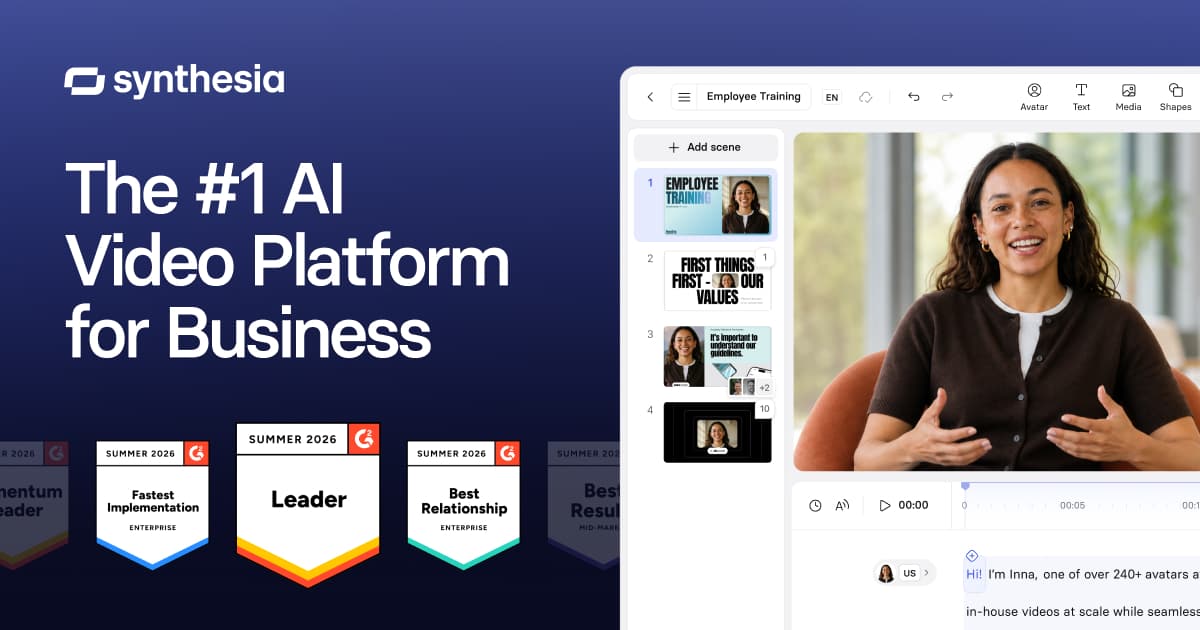
Commonly Cited Strengths & Limitations
Strengths
- Easy to use and get started
- User friendly - anyone can do it
- Easy to download and upload videos into an LMS or other video hosting platform
- Enterprise-ready
- Fast video creation
- Significant time savings on translation and content creation
Limitations
- AI avatars can feel scripted with limited emotional range and an 'uncanny valley' effect, especially on longer clips
- Content moderation can block standard business content with slow manual review
- Credit/minute-based pricing is restrictive and credits expire monthly
- Custom avatars are expensive (~$1,000/year) and can take days to create
- Rendering delays, as minor text edits can force a full re-render
- Voice quality is recognizable as synthetic and lacks a real narrator's warmth
- No-refund policy and inconsistent customer support responsiveness
- Some integrations require manual export/upload and imported assets may not stay editable
Common Use Cases
- Change management
- Sales enablement
- Operations training
- Internal communications
- Employee training
- Compliance training
- Technical training
- Roleplay practice
- Conversational surveys
- Video translation and dubbing
Details
- Pricing Model
- Freemium
- Team Size
- Enterprise
- Category
- Design & Creative
Who is Synthesia for?
Learning & Development teams
Create and update training courses at scale, including translating and updating thousands of courses quickly.
Sales teams
Use roleplays to practice difficult conversations and cold calls, and build sales enablement content faster.
Developers
Use the API, MCP server, and LiveKit integration to generate, dub, and embed interactive avatars programmatically.
Frequently Asked Questions
Is Synthesia free?
Synthesia offers a free plan.
Does Synthesia offer a free trial?
Yes, Synthesia offers a free trial.
Does Synthesia have an API?
Yes, Synthesia provides an API for developers.
What does Synthesia integrate with?
Synthesia integrates with LiveKit, Claude, ChatGPT, MCP.
Is Synthesia cloud-based or self-hosted?
Synthesia is offered as a cloud-based (SaaS) deployment.
What are the downsides of Synthesia?
AI avatars can feel scripted with limited emotional range and an 'uncanny valley' effect, especially on longer clips Also, Content moderation can block standard business content with slow manual review
Who is Synthesia best for?
Synthesia is best suited for Learning & Development teams, Sales teams, Developers.
What can I use Synthesia for?
Common uses for Synthesia include change management, sales enablement, operations training, internal communications.
How does Synthesia compare to InfiniteArt.ai?
Synthesia and InfiniteArt.ai are both used for design & creative -- specifically video editing tools. See the full side-by-side comparison for pricing and feature differences.
Key Features
- AI AvatarsChoose from 100s of customizable avatars for any video with outfit and background changes.
- Customizable AvatarsChange outfits and backgrounds to match your brand and context.
- Personal AvatarsCreate an avatar of yourself from a single photo for more personal videos.
- Avatar BuilderBuild realistic, 3D, comic, anime, or claymation avatars.
- SyrenSynthesia's most advanced AI video model yet.
- Video AssistantTurn any prompt, link, or file into a polished video with AI Assistant.
- InteractivityAdd calls to action, branching scenarios, and built-in quizzes to turn passive viewers active.
- PPT to VideoTurn PowerPoint presentations into fully editable, on-brand narrated videos in minutes.
- AI DubbingTranslate existing videos into 130+ languages with voice cloning and lip-sync.
- RoleplaysPractice difficult conversations with avatars that push back.
- SurveysRun surveys with avatars that ask, probe, and turn answers into insights.
- Interactive AvatarsEmbed a real-time, interactive avatar in your product.
- APIGenerate, customize, and scale AI videos programmatically.
- MCPMake Synthesia videos directly inside Claude or ChatGPT.
Integrations
Technical Details
- Deployment
- Cloud
- Target Market
- B2B
- API
- Available
- Free Trial
- Yes
- Free Plan
- Available
Official Pricing
Synthesia's published plans · verified Oct 16, 2026
Free
Contact Sales
- Get started for free
- Create free AI video
- No credit card required
Custom
Contact Sales
- Custom pricing
- Personalized tour
- Book demo
Pricing shown above is sourced from Synthesia's own published plans as of Oct 16, 2026 and can change at any time -- confirm current pricing on Synthesia's own site before purchasing.
Full Synthesia pricing breakdown, free plan and cheaper alternatives →
Real Pricing from Verified Users
See what people actually pay for Synthesia
Reviews
0 reviews
No reviews yet. Be the first to share your experience!
Switching Stories
Real migration experiences with Synthesia
Discussion
Ask questions, share tips, or discuss this tool with other users.
No discussion yet. Start the conversation!
Similar tools in Design & Creative
Other listed tools in Design & Creative, not reviewed as direct alternatives

AI creative studio for iOS and Mac that turns text into images and animates them into video.
Also Video Editing Tools
- Text-to-image generation
- Generate videos
- Multiple image models
AI dubbing and localization with a full editor to transcribe, translate, caption, and dub in 50+ languages.
Also Video Editing Tools
- Automated dubbing
- Transcription
- Translation

- Seedance 2.5
- Nano Banana Pro
- Higgsfield Genjutsu

AI creative agents that turn one brief into on-brand images, video, copy, slides, and audio
Also Video Editing Tools
- AI Agent
- Brand consistency
- Smart Model Routing

- ClipAnything
- ReframeAnything
- AI captioning

- Templates Library
- Magic Studio (AI)
- Magic Write
Also used for
People Also Viewed




More in Design & Creative

Collaborative interface design tool

The world's best image editing software