Voysum
Turn audio and video into transcripts, AI notes and subtitles
Data verified Nov 7, 2026
Score
- Price
- From $7/month (Starter)
- Try it free
- Free plan
- Best for
- Researchers and interviewers
- Platforms
- Web
Editorial Verdict
AI-researched, not hands-on testedVoysum is a browser-based workspace that transcribes audio and video up to 100 MB, then adds AI notes, summaries, chapters and translations with TXT, SRT, VTT and CSV exports. It suits people handling meetings, interviews, lectures or creator videos who want one place to edit the transcript and generate notes. The main limits are the 100 MB upload size and, on the free plan, 30 minutes per file, 3 files per day and 120 minutes per month.
Reviewed by AIToolPundit Editorial Team · last verified November 2026
About Voysum
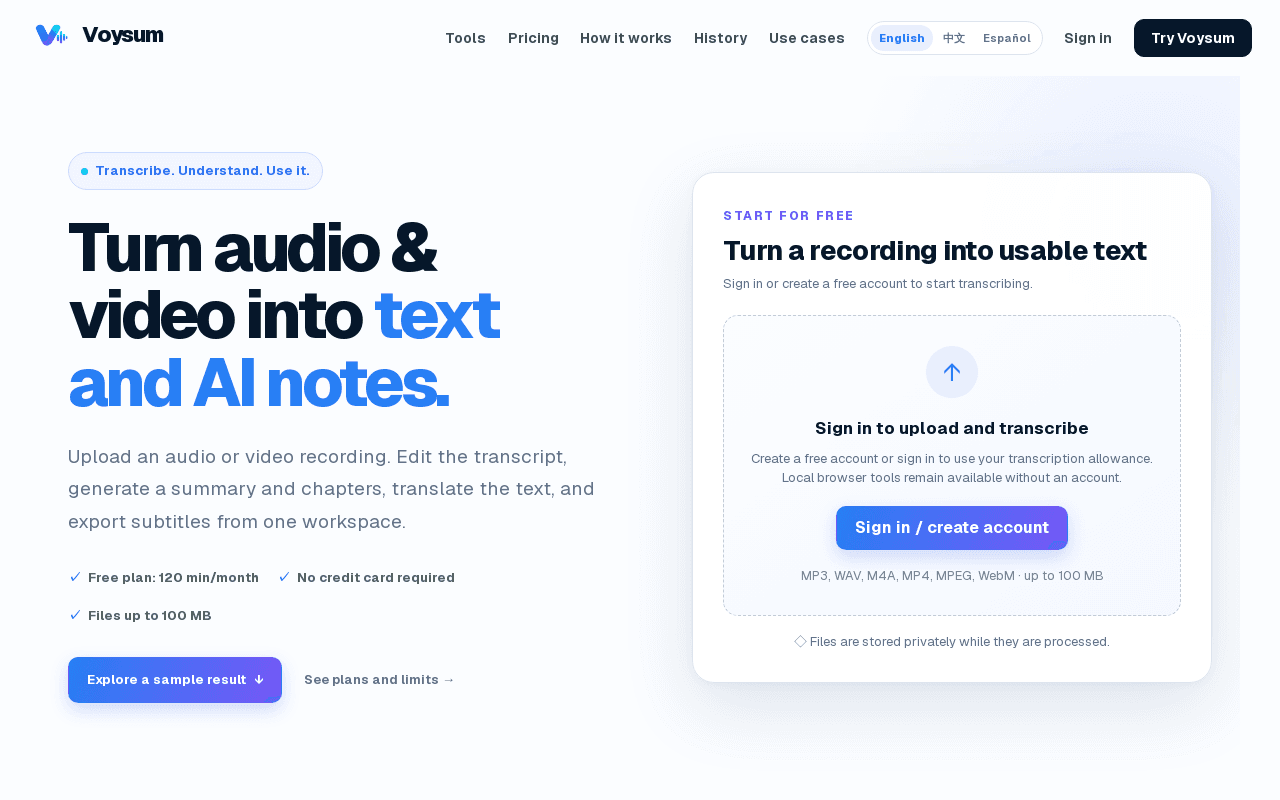
Voysum is a web-based transcription workspace that converts audio and video recordings into editable text, timed segments, AI notes, chapters, summaries and translations. Users upload an audio or video file up to 100 MB in common formats such as MP3, WAV, M4A, MP4, MPEG and WebM, review the timestamped transcript, and generate additional outputs like meeting notes, action items or a translated version from the same source.
After processing, the result workspace lets users edit the text, search answers, review segments against timestamps and export the content as TXT, SRT, VTT or CSV. Voysum also provides a separate set of 46 free browser utilities for tasks like extracting audio from video, converting MP4 to MP3, cutting audio, fixing subtitles, converting SRT to VTT, removing filler words, counting words and stripping timestamps; tools marked as local run on the user's device without uploading files.
Screenshots
Commonly Cited Strengths & Limitations
Strengths
- Free plan with 120 minutes per month and no credit card required
- Produces transcript, AI notes, chapters, summary and translation from one upload
- Exports as TXT, SRT, VTT and CSV plus a set of free local browser utilities
Limitations
- Uploads are capped at 100 MB per file
- Free plan is limited to 3 transcriptions per day, 120 minutes per month and 30 minutes per file
- A free account is required to transcribe, and payment is available only after signing in
Common Use Cases
- Turn a project call or team meeting into a transcript plus summary and action items
- Produce SRT or VTT captions and reusable content drafts from a tutorial or podcast
- Transcribe a lecture or class recording and generate chapter outlines and study notes
Details
- Pricing Model
- Freemium
- Starting Price
- From $7/month (Starter)
- Platforms
- Web
- Category
- AI Voice & Audio
Who is Voysum for?
Researchers and interviewers
People recording customer or research interviews who need searchable, timestamped answers and copyable quotes.
Video creators and students
Creators exporting SRT or VTT captions from tutorials and podcasts, and students turning lecture recordings into study notes with chapters.
Frequently Asked Questions
Is Voysum free?
Voysum offers a free plan, with paid plans starting at From $7/month (Starter).
Does Voysum have an API?
Voysum does not currently offer a public API.
What platforms does Voysum support?
Voysum is available on Web.
What are the downsides of Voysum?
Uploads are capped at 100 MB per file Also, Free plan is limited to 3 transcriptions per day, 120 minutes per month and 30 minutes per file
Who is Voysum best for?
Voysum is best suited for Researchers and interviewers, Video creators and students.
What can I use Voysum for?
Common uses for Voysum include turn a project call or team meeting into a transcript plus summary and action items, produce srt or vtt captions and reusable content drafts from a tutorial or podcast, transcribe a lecture or class recording and generate chapter outlines and study notes.
How does Voysum compare to Synthflow AI?
Voysum and Synthflow AI are both used for ai voice & audio -- specifically meeting & transcription tools. See the full side-by-side comparison for pricing and feature differences.
Key Features
- Audio and video transcriptionUpload MP3, WAV, M4A, MP4, MPEG or WebM files up to 100 MB and get a timestamped transcript with reviewable segments.
- AI notes, summaries and chaptersGenerate structured notes, meeting summaries, action items, key points and chapter outlines from the transcript.
- TranslationTranslate the transcript into another language alongside the original text in the result workspace.
- Multiple export formatsDownload transcript text as TXT, timed subtitles as SRT or VTT, or timed segments as CSV, or copy text from the workspace.
- Editable transcript workspaceReview and edit names, numbers and quotes in the transcript, and review each timed segment before exporting.
- Free local browser toolsUse 46 free utilities for audio extraction, format conversion, subtitle fixes and transcript clean-up, with local tools processing files on the device.
Technical Details
- Free Plan
- Available
Official Pricing
Voysum's published plans · verified Nov 7, 2026
Free
$0
- 120 minutes per month
- Up to 3 transcriptions per day
- 30 minutes per file
- TXT and subtitle exports
Starter
$7/mo
- 1,200 minutes per month
- Editable transcripts
- TXT, SRT, VTT and CSV exports
- Private file processing
Pro
$18/mo
- 6,000 minutes per month
- Everything in Starter
- Five times more monthly minutes
- Stripe billing portal access
Pricing shown above is sourced from Voysum's own published plans as of Nov 7, 2026 and can change at any time -- confirm current pricing on Voysum's own site before purchasing.
Full Voysum pricing breakdown, free plan and cheaper alternatives →
Real Pricing from Verified Users
See what people actually pay for Voysum
Reviews
0 reviews
No reviews yet. Be the first to share your experience!
Switching Stories
Real migration experiences with Voysum
Discussion
Ask questions, share tips, or discuss this tool with other users.
No discussion yet. Start the conversation!
Similar tools in AI Voice & Audio
Other listed tools in AI Voice & Audio, not reviewed as direct alternatives

End-to-end Voice AI platform with in-house telephony for automated business phone calls.
Also Meeting & Transcription Tools
- BELL Framework
- Multi-Agent System
- Custom Telephony
AI-powered search engine that mines filings and earnings transcripts for investment insights.
Also Document Processing Tools
- Document Search
- Document Alerts & Filing Screener
- Trending Topics & Sentiment Analysis

- Free AI music generator
- 10 free songs daily
- Granular creation controls
AI dubbing and localization with a full editor to transcribe, translate, caption, and dub in 50+ languages.
Also Voice & Speech Tools
- Automated dubbing
- Transcription
- Translation

- Meeting Transcription & Recording
- Speaker Recognition
- Auto-Language Detection

- Browser extensions
- Mobile and desktop apps
- Reads AI chat answers
Also used for
People Also Viewed


More in AI Voice & Audio
AI voice & audio generation

AI noise cancellation and meeting notes that work across any calling app.

Build and deploy voice AI agents that handle phone calls at enterprise scale