Burning Bridges AI
Put your photo into a prepared party-scene AI video with original sound
Data verified Oct 30, 2026
Score
- Price
- $8.3/month (Starter, billed $100 yearly)
- Try it free
- Free plan
- Best for
- Social creators making a shared-performance clip
- Platforms
- Web
Editorial Verdict
AI-researched, not hands-on testedBurning Bridges AI generates about a 29-second landscape video from one lead photo and up to five optional background portraits, dropping them into a fixed party-room cup scene with its original soundtrack and movement. It suits creators who want that specific performance for group chats or team posts without recording themselves or writing a prompt. The main limitation is cost scope: the 18-credit free Basic allowance does not cover a single generation at the current 432-credit 480p estimate, so any finished video requires a paid plan or credit pack.
Reviewed by AIToolPundit Editorial Team · last verified October 2026
About Burning Bridges AI
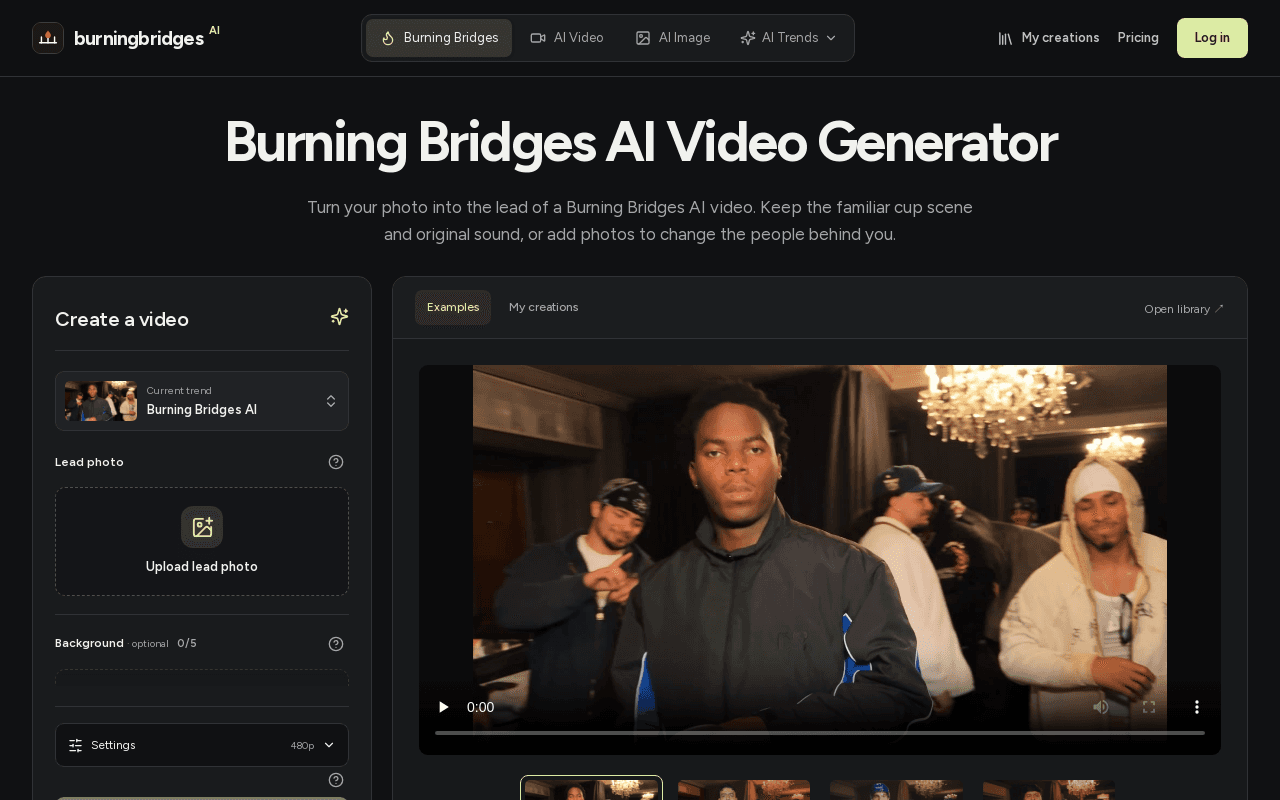
Burning Bridges AI is a web video generator that places one or more uploaded photos into a prepared party-room performance built around a metal-cup scene. The user supplies a lead photo and may add up to five optional background portraits, keeping the roughly 29-second landscape clip, framing, movement and original soundtrack from the reference. Output is available at 480p, 720p or 1080p, selected in Settings before generating.
Generations are credit-based: the current estimates are 432 credits for 480p, 924 credits for 720p and 2305 credits for 1080p. A free Basic account grants 18 signup credits with watermarked previews, which is not enough for one Burning Bridges AI video. Paid Starter, Pro and Business subscriptions, plus one-time credit packs, provide credits that can be used across image and video models and include watermark-free downloads and generation history under My creations.
Screenshots
Commonly Cited Strengths & Limitations
Strengths
- No reference video, music upload or written prompt is required
- The generated clip includes the reference soundtrack
- Three resolution choices and optional background recasting with up to five portraits
Limitations
- The free 18-credit Basic allowance does not cover a single Burning Bridges AI video
- One fixed scene, length and 16:9 landscape format; no duration or vertical-format selector
- Fine details like lettering, jewelry or parts hidden in the photo can change during motion and no completion time is guaranteed
Common Use Cases
- Solo lead-only video using one photo while keeping the original supporting cast
- Group recast video with portraits of friends or teammates in matching outfits
- Original-character performance using a prepared character portrait brought in as the lead
Details
- Pricing Model
- Freemium
- Starting Price
- $8.3/month (Starter, billed $100 yearly)
- Platforms
- Web
- Category
- AI Image & Video Generation
Who is Burning Bridges AI for?
Social creators making a shared-performance clip
Individuals who want to place themselves as the lead of the fixed party-room scene for a group chat or social post while keeping the original crowd intact.
Friend groups and teams recasting the full scene
Groups who provide separate portraits of up to five consenting friends or teammates to recast supporting people alongside the lead.
Frequently Asked Questions
Is Burning Bridges AI free?
Burning Bridges AI offers a free plan, with paid plans starting at $8.3/month (Starter, billed $100 yearly).
Does Burning Bridges AI have an API?
Burning Bridges AI does not currently offer a public API.
What platforms does Burning Bridges AI support?
Burning Bridges AI is available on Web.
What are the downsides of Burning Bridges AI?
The free 18-credit Basic allowance does not cover a single Burning Bridges AI video Also, One fixed scene, length and 16:9 landscape format; no duration or vertical-format selector
Who is Burning Bridges AI best for?
Burning Bridges AI is best suited for Social creators making a shared-performance clip, Friend groups and teams recasting the full scene.
What can I use Burning Bridges AI for?
Common uses for Burning Bridges AI include solo lead-only video using one photo while keeping the original supporting cast, group recast video with portraits of friends or teammates in matching outfits, original-character performance using a prepared character portrait brought in as the lead.
How does Burning Bridges AI compare to InfiniteArt.ai?
Burning Bridges AI and InfiniteArt.ai are both used for ai image & video generation -- specifically video editing tools. See the full side-by-side comparison for pricing and feature differences.
Key Features
- Lead photo swapUpload one photo of a person; the lead appearance in the reference performance is replaced using that photo, guiding hair, clothing, build and facial appearance.
- Optional background castAdd up to five portraits to recast supporting people in the scene, or leave Background empty to keep the original crowd.
- Three output resolutionsChoose 480p, 720p or 1080p in Settings; higher resolutions increase the output size and credit cost per video.
- Original soundtrack retainedThe completed video uses the reference soundtrack. If audio processing fails on an otherwise finished picture, an audio retry is offered on that result.
- Generation history under My creationsSubmitted tasks appear in My creations where in-progress jobs can be followed and completed videos watched and downloaded.
- Watermark-free paid downloadsPaid plans provide watermark-free image and video downloads; the free Basic tier produces watermarked previews only.
Technical Details
- Free Plan
- Available
Official Pricing
Burning Bridges AI's published plans · verified Oct 30, 2026
Basic
$0
- 18 one-time signup credits
- Up to 3 images or 1 video
- Watermarked previews and downloads
- Generation history included
Starter
$100/year ($8.3/month average)/yr
- 2,400 credits per year
- Up to 400 images or 133 videos
- Watermark-free image and video downloads
- Generation history in your account
Pro
$360/year ($30/month average)/yr
- 21,600 credits per year
- Up to 3,600 images or 1,200 videos
- Credits usable across image and video models
- Watermark-free image and video downloads
Pro (monthly)
$49.9/month/mo
- Monthly billing of the Pro plan
- Credits usable across image and video models
- Watermark-free image and video downloads
- Generation history in your account
Business
$599/year ($49.9/month average)/yr
- 48,000 credits per year
- Up to 8,000 images or 2,666 videos
- Credits usable across image and video models
- Watermark-free image and video downloads
Business (monthly)
$99.9/month/mo
- Monthly billing of the Business plan
- Credits usable across image and video models
- Watermark-free image and video downloads
- Generation history in your account
Pricing shown above is sourced from Burning Bridges AI's own published plans as of Oct 30, 2026 and can change at any time -- confirm current pricing on Burning Bridges AI's own site before purchasing.
Full Burning Bridges AI pricing breakdown, free plan and cheaper alternatives →
Real Pricing from Verified Users
See what people actually pay for Burning Bridges AI
Reviews
0 reviews
No reviews yet. Be the first to share your experience!
Switching Stories
Real migration experiences with Burning Bridges AI
Discussion
Ask questions, share tips, or discuss this tool with other users.
No discussion yet. Start the conversation!
Similar tools in AI Image & Video Generation
Other listed tools in AI Image & Video Generation, not reviewed as direct alternatives

AI creative studio for iOS and Mac that turns text into images and animates them into video.
Also Video Editing Tools
- Text-to-image generation
- Generate videos
- Multiple image models

Adobe's all-in-one generative AI creative studio for commercial-safe content
Also Video Editing Tools
- Image Generation
- Video Generation
- Audio Generation
AI dubbing and localization with a full editor to transcribe, translate, caption, and dub in 50+ languages.
Also Video Editing Tools
- Automated dubbing
- Transcription
- Translation

- Seedance 2.5
- Nano Banana Pro
- Higgsfield Genjutsu
- Raya AI agent
- Competitor strategy extraction
- Customer review mining

AI creative agents that turn one brief into on-brand images, video, copy, slides, and audio
Also Video Editing Tools
- AI Agent
- Brand consistency
- Smart Model Routing
People Also Viewed



More in AI Image & Video Generation

All-in-one audio & video editing

Open-source image generation AI