
ChatPDF
Chat with any PDF to get instant, source-linked answers from your documents.
Data verified Oct 17, 2026
- Price
- Free (2 documents per day); ChatPDF Plus price see site
- Try it free
- Free plan
- Best for
- Students
Editorial Verdict
AI-researched, not hands-on testedChatPDF is a web tool for uploading a document and asking questions, getting summaries, or comparing content, with answers linked to cited passages in the source. It suits students, researchers and professionals who want quick answers from papers, reports or contracts without setting anything up. The free plan is small (2 documents per day), and the Plus price and per-file limits are not published on the public site. For self-hosted or private document chat, look at PrivateGPT or AnythingLLM.
Reviewed by AIToolPundit Editorial Team · last verified October 2026
About ChatPDF
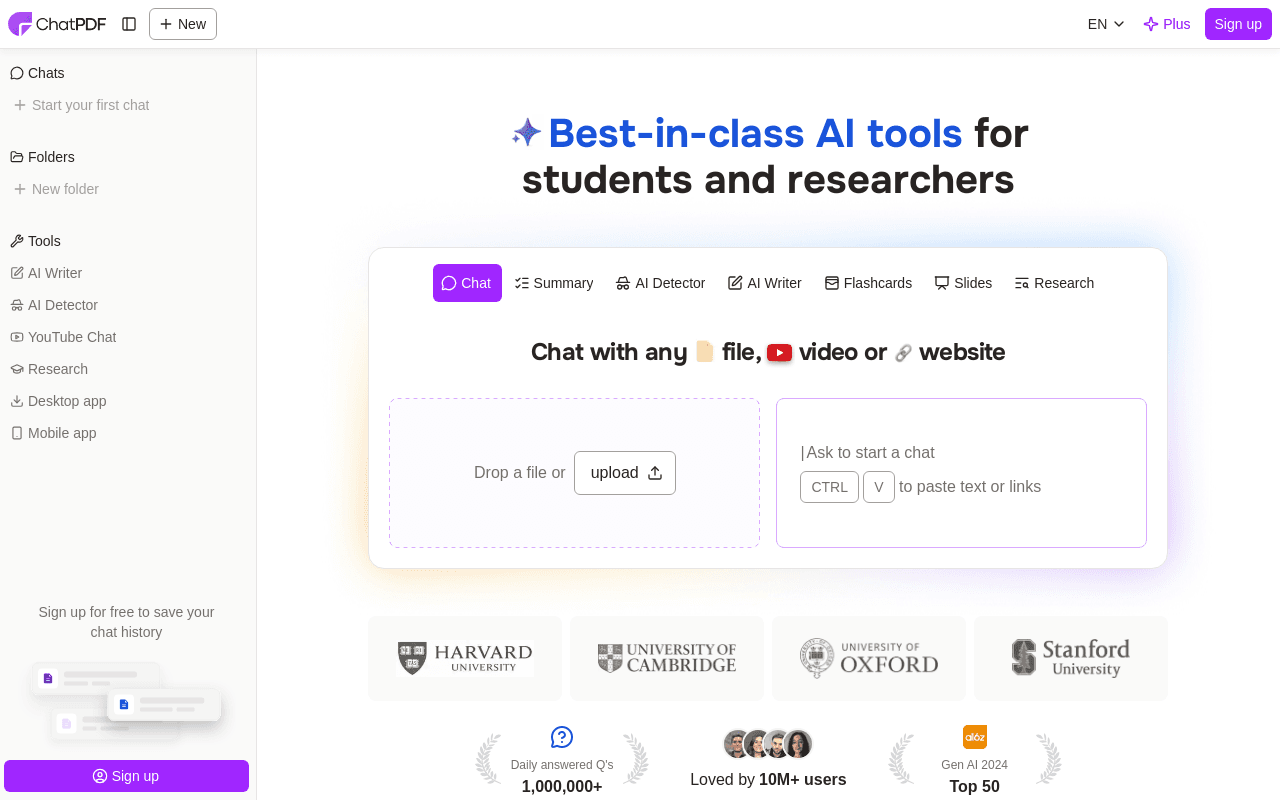
ChatPDF is an AI document assistant that lets you upload PDFs (plus Word, PowerPoint, Markdown, and text files) and ask questions in natural language, returning answers linked back to specific pages so you can verify sources. It's aimed at students turning readings into study notes and at analysts, researchers, and consultants skimming long reports for key takeaways. Its main differentiator is being one of the earliest, simplest ChatGPT-style PDF chat tools, with cited page references and no account required to start.
Screenshots
Commonly Cited Strengths & Limitations
Strengths
- Answers carry built-in citations that point back to the original PDF content
- Chat and document sit side by side, so answers are easy to check
- Folders allow chatting across several files in one conversation
- Accepts PDF, Word, PowerPoint, Markdown and text files, and works in many languages
Limitations
- Free tier is restrictive (roughly 2 PDFs/day, 50 questions, and a page cap)
- Accuracy declines on longer, more complex documents, requiring users to verify answers
- Cannot analyze or combine multiple PDFs in a single chat on lower tiers
- 32MB file size limit even on the paid plan, and unusual or damaged PDFs may not work
- Some users feel it's not worth the price versus a general GPT-4 subscription
- Reports of continued billing after cancellation and slow customer support responses
- Better for single-document Q&A than managing a large library of files
Common Use Cases
- Summarizing long reports and research papers
- Turning course readings into study notes
- Extracting key metrics and takeaways from documents
- Asking clarifying questions about a document's content
- Programmatically querying PDFs via API
Details
- Pricing Model
- Freemium
- Starting Price
- Free (2 documents per day); ChatPDF Plus price see site
- Founded
- 2023
- Team Size
- Individuals, Small Business
- Headquarters
- Laboe, Germany
- Category
- Data Management
Who is ChatPDF for?
Students
Summaries and cited answers help with study material, papers and exam preparation.
Researchers
Chatting across several papers in a folder, with citations back to the source, speeds up literature reading.
Professionals
Contracts, financial reports and manuals can be queried in plain language with answers tied to the document text.
Frequently Asked Questions
Is ChatPDF free?
ChatPDF offers a free plan, with paid plans starting at Free (2 documents per day); ChatPDF Plus price see site.
Does ChatPDF have an API?
Yes, ChatPDF provides an API for developers.
Is ChatPDF cloud-based or self-hosted?
ChatPDF is offered as a cloud-based (SaaS) deployment.
What are the downsides of ChatPDF?
Free tier is restrictive (roughly 2 PDFs/day, 50 questions, and a page cap) Also, Accuracy declines on longer, more complex documents, requiring users to verify answers
Who is ChatPDF best for?
ChatPDF is best suited for Students, Researchers, Professionals.
What can I use ChatPDF for?
Common uses for ChatPDF include summarizing long reports and research papers, turning course readings into study notes, extracting key metrics and takeaways from documents, asking clarifying questions about a document's content.
What is the best alternative to ChatPDF?
Our reviewed alternatives to ChatPDF are ChatDOC, Sider AI, PDFgear, PrivateGPT, AnythingLLM, Kotaemon, PDF.ai and Humata. Open-source options: PrivateGPT, AnythingLLM, Kotaemon.
How does ChatPDF compare to AlphaResearch?
ChatPDF and AlphaResearch are both used for data management -- specifically document processing tools. See the full side-by-side comparison for pricing and feature differences.
Key Features
- Chat with PDFAsk questions about a document in natural language and get conversational AI answers, similar to ChatGPT.
- Source-linked citationsAnswers reference the original page numbers or snippets so you can verify or explore further.
- Multiple file formatsSupports PDF, Word (.doc/.docx), PowerPoint (.ppt/.pptx), Markdown, and text files.
- Multi-document chatRegistered/Plus users can chat across multiple documents rather than one at a time.
- Multilingual supportUpload documents in any language and ask questions in a different preferred language.
- No account to startCore PDF chat features are usable immediately without signing up; an account adds saved history.
- Large document handlingPlus plan supports PDFs up to 2,000 pages and 32MB per file.
- Developer APIA backend API lets developers add PDFs by upload or public URL and send chat messages against a source ID.
Technical Details
- Deployment
- Cloud
- Target Market
- Both
- API
- Available
- Free Plan
- Available
Support
Official Pricing
ChatPDF's published plans · verified Oct 17, 2026
Free
$0/mo
- Analyze 2 documents per day
- Limited questions per day
- Page-count cap per document
Plus
$19.99/mo
- Unlimited document analysis
- Unlimited questions
- PDFs up to 2,000 pages
- 32MB file size per PDF
- Multi-document chat
Plus (Yearly)
$139.99/yr
- All Plus features billed annually
Pricing shown above is sourced from ChatPDF's own published plans as of Oct 17, 2026 and can change at any time -- confirm current pricing on ChatPDF's own site before purchasing.
Full ChatPDF pricing breakdown, free plan and cheaper alternatives →
Real Pricing from Verified Users
See what people actually pay for ChatPDF
Reviews
0 reviews
No reviews yet. Be the first to share your experience!
Switching Stories
Real migration experiences with ChatPDF
Discussion
Ask questions, share tips, or discuss this tool with other users.
No discussion yet. Start the conversation!
ChatPDF alternatives we reviewed
Reviewed when this listing was published; open-source options are marked.
ChatDOC
PDF chat tool with a strong focus on citation accuracy and table/document parsing.
Sider AI
AI assistant that includes chat-with-PDF alongside broader browsing and writing tools.
PDFgear
Free PDF editor with a built-in AI chatbot for querying documents.
PrivateGPT
Open sourceA complete API layer for private AI applications on local models, covering RAG, skills, tools and MCP, and working with any OpenAI-compatible inference server.
- Cost:
- Free / self-host
- Licence:
- Open source
AnythingLLM
Open sourceA local-first AI application for chatting with your own documents and running agents, built by Mintplex Labs.
- Cost:
- Free / self-host
- Licence:
- Open source
Kotaemon
Open sourceAn open-source RAG-based tool for chatting with your documents.
- Cost:
- Free / self-host
- Licence:
- Open source
PDF.ai
Lets users chat with PDF documents and provides a PDF API for parsing, extracting and splitting them.
Humata
Answers questions about your uploaded documents and cites the relevant sections in its answers.
Similar tools in Data Management
Other listed tools in Data Management, not reviewed as direct alternatives
AI-powered search engine that mines filings and earnings transcripts for investment insights.
Also Document Processing Tools
- Document Search
- Document Alerts & Filing Screener
- Trending Topics & Sentiment Analysis

- Capture by forwarding
- Voice transcription
- Article reading
Chat with AI versions of favorite fictional, anime, and historical characters.
Also Chat Assistants
- Diverse character library
- Custom character creation
- Voice chat
- AI support
- Live chat
- AI copilot
All-in-one AI knowledge workspace for deeper thinking, not just faster answers
Also Document Processing Tools
- Ponder Agent
- Infinite canvas / knowledge mapping
- Multi-source import
- Live chat widget
- AI chatbot
- Omnichannel inbox
Also used for
People Also Viewed


More in Data Management


Customer data platform