DragGAN
Interactive point-based image editing that lets you drag any point of a GAN image to a target
Data verified Sep 18, 2026
Score
- Try it free
- Free plan
- Best for
- Computer vision & graphics researchers
About DragGAN
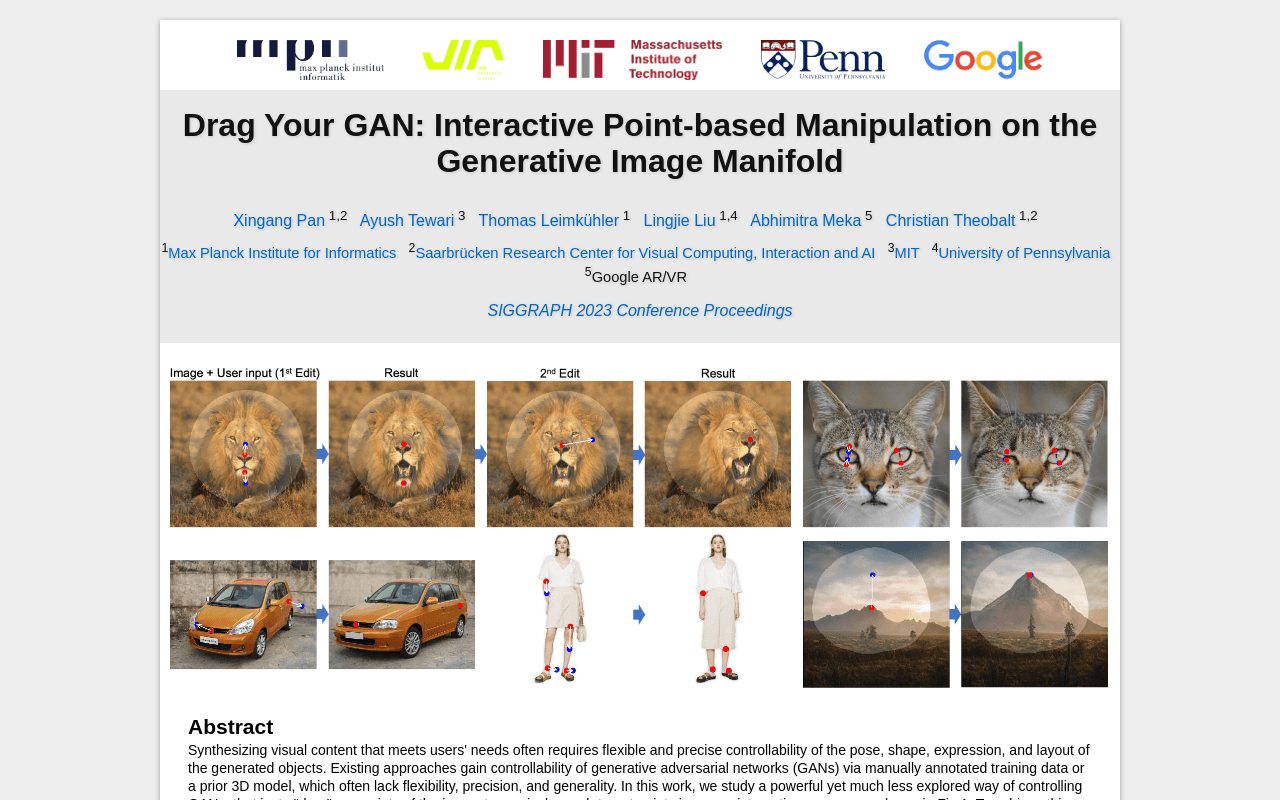
DragGAN is a research method (SIGGRAPH 2023, from Max Planck Institute for Informatics and collaborators) for interactive point-based image manipulation: you place handle points on a GAN-generated image and drag them to target positions to precisely control pose, shape, expression, and layout across categories like animals, humans, cars, and landscapes. It's aimed at computer-vision and graphics researchers and creative technologists rather than commercial users, and it can also edit real photos via GAN inversion. What sets it apart is its combination of feature-based motion supervision with GAN-feature point tracking, giving pixel-level 'drag' control without annotated training data or a prior 3D model.
Screenshots
Commonly Cited Strengths & Limitations
Strengths
- Improved image manipulation and point tracking over prior methods
- No reliance on manually annotated data or a prior 3D model
- Realistic outputs that follow object rigidity, even hallucinating occluded content
Limitations
- Primarily edits GAN-generated images; custom or real images can be distorted by GAN inversion limitations
- Struggles with out-of-distribution manipulations (e.g., unnatural poses), which can produce artifacts
- Handle points in texture-less regions can suffer from tracking drift
- Constrained by the GAN's training data, so manipulations outside that range can cause unwanted changes elsewhere in the image
Common Use Cases
- Precisely deforming generated images by dragging handle points to targets
- Controlling pose, shape, expression, and layout of synthesized objects
- Editing real photos through GAN inversion
- Point tracking and image manipulation research
Details
- Pricing Model
- Free
- Founded
- 2023
- Headquarters
- Saarbrücken, Germany
- Category
- Design & Creative
Who is DragGAN for?
Computer vision & graphics researchers
Use DragGAN to study interactive control of GANs and to benchmark image manipulation and point tracking against prior approaches.
Creative technologists & digital artists
Deform generated images of faces, animals, cars, and landscapes by dragging points to reshape pose, expression, and layout.
Frequently Asked Questions
Is DragGAN free?
Yes, DragGAN is free to use.
Does DragGAN have an API?
Yes, DragGAN provides an API for developers.
Is DragGAN open source?
Yes, DragGAN is open source.
What are the downsides of DragGAN?
Primarily edits GAN-generated images; custom or real images can be distorted by GAN inversion limitations Also, Struggles with out-of-distribution manipulations (e.g., unnatural poses), which can produce artifacts
Who is DragGAN best for?
DragGAN is best suited for Computer vision & graphics researchers, Creative technologists & digital artists.
What can I use DragGAN for?
Common uses for DragGAN include precisely deforming generated images by dragging handle points to targets, controlling pose, shape, expression, and layout of synthesized objects, editing real photos through gan inversion, point tracking and image manipulation research.
How does DragGAN compare to InfiniteArt.ai?
DragGAN and InfiniteArt.ai are both used for design & creative -- specifically photo editing tools. See the full side-by-side comparison for pricing and feature differences.
Key Features
- Point-based controllabilityGives precise control over the pose, shape, expression, and layout of generated objects.
- Interactive draggingLets users drag handle points on an image to reach specified target positions.
- Feature-based motion supervisionDrives each handle point toward its target using the GAN's own feature representations.
- GAN-feature point trackingUses discriminative GAN features to keep localizing handle points as the image deforms.
- Multi-category supportWorks across diverse subjects including animals, humans, cars, and landscapes.
- Real image manipulationSupports editing real photographs through GAN inversion.
- Non-commercial licenseReleased under the Creative Commons CC BY-NC 4.0 license for non-commercial use.
Technical Details
- API
- Available
- Free Plan
- Available
Real Pricing from Verified Users
See what people actually pay for DragGAN
Reviews
0 reviews
No reviews yet. Be the first to share your experience!
Switching Stories
Real migration experiences with DragGAN
Discussion
Ask questions, share tips, or discuss this tool with other users.
No discussion yet. Start the conversation!
Similar tools in Design & Creative
Other listed tools in Design & Creative, not reviewed as direct alternatives

AI creative studio for iOS and Mac that turns text into images and animates them into video.
Also Photo Editing Tools
- Text-to-image generation
- Generate videos
- Multiple image models
AI headshot generator that turns your selfies into professional headshots in under 90 minutes.
Also Photo Editing Tools
- AI Headshot Generation
- AI Virtual Try-On
- Reprocessing
All-in-one browser AI platform for generating images, video, music, voice chat, and more.
Also Photo Editing Tools
- AI Image Generator
- AI Video Generator
- AI Music Generator

Turn your photos into anime-style portraits, or generate original anime art from text.
Also Photo Editing Tools
- Photo to Anime
- Text to Anime Generator
- Gender Selection
AI-generated diverse faces and full-body humans for ads, design, ML, and research.
Also Photo Editing Tools
- Faces
- Face Generator
- Humans

Free browser-based AI photo editor, image generator, and video maker powered by top AI models
Also Photo Editing Tools
- AI Image Generator
- AI Video Generator
- AI Face Swap
Also used for
People Also Viewed



More in Design & Creative

Collaborative interface design tool

The world's best image editing software