NoviSign Digital Signage
Cloud digital signage CMS for remote screen content management
Data verified Nov 10, 2026
Score
- Price
- From $14 per screen/month, billed annually (Business)
- Try it free
- Free trial (30 days)
- Best for
- Small and mid-sized businesses
- Platforms
- Web, Android, Chrome, Windows, Samsung Tizen, Amazon Signage Stick, LG webOS, API
Editorial Verdict
AI-researched, not hands-on testedNoviSign is cloud-based digital signage software for designing, scheduling, and remotely managing display content through a drag-and-drop web studio with templates, widgets, and offline playback. It suits restaurants, schools, offices, and multi-location operators who want a hardware-agnostic signage CMS without on-prem servers. The main limitation is per-screen licensing, billed annually at the prices shown, with a 30-day trial but no permanent free tier, so costs grow with display count. Teams willing to self-host can look at open-source alternatives such as Xibo and Anthias.
Reviewed by AIToolPundit Editorial Team · last verified November 2026
About NoviSign Digital Signage
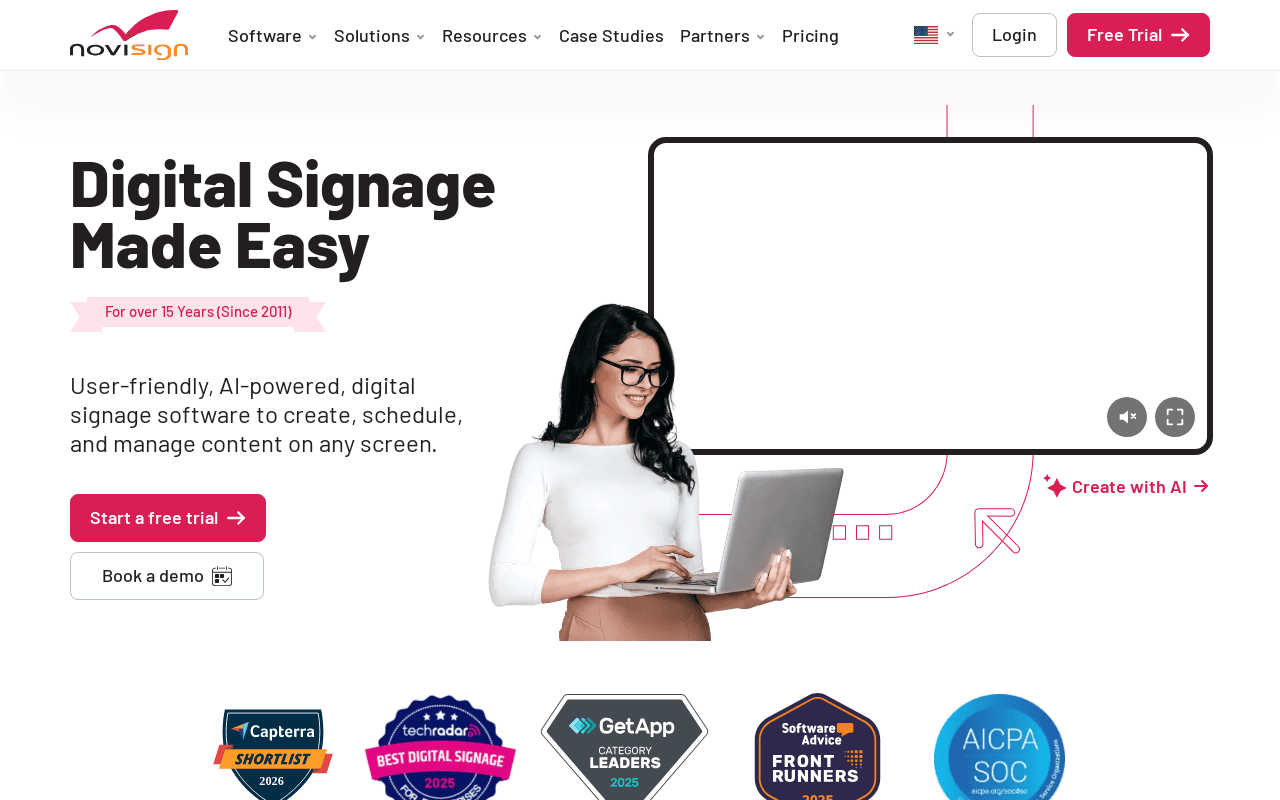
NoviSign is a cloud-based digital signage platform that lets users design, schedule, and manage content on remote screens from a web studio. The drag-and-drop editor includes 500+ templates and 50+ widgets and apps covering videos, slideshows, weather, RSS, social feeds and touch-screen interactivity. Content can be scheduled into playlists, screens can be monitored through a dashboard, and proof-of-play reports are available.
The platform is described as hardware agnostic and supports offline playback; the home page names Android, Chrome, Windows, Samsung Tizen, Amazon Signage Stick and LG webOS players. Business Plus adds Studio AI content creation, a Mobile Device Manager, data-source connections, IoT and RFID events and integrations with Canva, Zapier, Outlook, Google Calendar, SharePoint, Google Drive, Dropbox, PowerBI, Tableau, Toast POS and Amadeus Delphi. Premium adds SSO and SAML, an Open API, an MCP Connector, admin management, content approval workflows, audit logs and Microsoft Clarity analytics. NoviSign states it is SOC 2 Type II certified and hosted on Amazon S3.
Screenshots
Commonly Cited Strengths & Limitations
Strengths
- Drag-and-drop editor with 500+ templates and 50+ widgets and apps
- Hardware-agnostic playback with offline mode and scheduled playlists
- SOC 2 Type II certified with free setup assistance, training and a 30-day free trial
Limitations
- Per-screen licensing means costs scale with the number of displays
- AI tools, integrations, Open API, SSO and audit logs sit in the higher-priced tiers, and white-label is a Partners offer
- The pages show a 30-day free trial, and no permanent free plan
Common Use Cases
- Menu boards and promotional screens for restaurants and retail
- Internal communications and bulletin displays in healthcare, schools and corporate offices
- Interactive touch-screen content and data-driven displays powered by CSV, JSON, PowerBI or Tableau
Details
- Pricing Model
- Free Trial
- Starting Price
- From $14 per screen/month, billed annually (Business)
- Platforms
- WebAndroidChromeWindowsSamsung TizenAmazon Signage StickLG webOSAPI
- Category
- Content Management
Who is NoviSign Digital Signage for?
Small and mid-sized businesses
Restaurants, retailers, schools, and offices needing easy menu boards, promotions, and internal comms displays without an IT team.
Multi-location and enterprise operators
Organizations needing centralized admin, SSO, API access, approval workflows, and audit logs across many screens and sub-accounts.
Frequently Asked Questions
How much does NoviSign Digital Signage cost?
NoviSign Digital Signage starts at From $14 per screen/month, billed annually (Business) (Free Trial).
Does NoviSign Digital Signage offer a free trial?
Yes, NoviSign Digital Signage offers a free trial of 30 days.
Does NoviSign Digital Signage have an API?
Yes, NoviSign Digital Signage provides an API for developers.
What platforms does NoviSign Digital Signage support?
NoviSign Digital Signage is available on Web, Android, Chrome, Windows, Samsung Tizen, Amazon Signage Stick, LG webOS, API.
What are the downsides of NoviSign Digital Signage?
Per-screen licensing means costs scale with the number of displays Also, AI tools, integrations, Open API, SSO and audit logs sit in the higher-priced tiers, and white-label is a Partners offer
Who is NoviSign Digital Signage best for?
NoviSign Digital Signage is best suited for Small and mid-sized businesses, Multi-location and enterprise operators.
What can I use NoviSign Digital Signage for?
Common uses for NoviSign Digital Signage include menu boards and promotional screens for restaurants and retail, internal communications and bulletin displays in healthcare, schools and corporate offices, interactive touch-screen content and data-driven displays powered by csv, json, powerbi or tableau.
What is the best alternative to NoviSign Digital Signage?
Our reviewed alternatives to NoviSign Digital Signage are Xibo, Anthias, ScreenCloud, Yodeck, Rise Vision, OptiSigns, Screenly and Mvix. Open-source options: Xibo, Anthias.
How does NoviSign Digital Signage compare to We0.ai?
NoviSign Digital Signage and We0.ai are both used for content management -- specifically no-code tools. See the full side-by-side comparison for pricing and feature differences.
Key Features
- Drag-and-drop studioBrowser-based editor for building layouts without technical skills, with 500+ customizable templates.
- Widgets and apps libraryMore than 50 widgets and apps including weather, news, RSS, social feeds, clocks and slideshows.
- Scheduling and playlistsSchedule templates to play at set times, on repeat or one time, with expiration times, and send them to selected screens.
- Remote screen managementUpdate and control display content from the Studio platform regardless of device location, with offline playback support.
- Monitoring and reportsDashboard shows screen and media-player status and last update, with proof-of-play and media statistic reports.
- Integrations and APIHigher plans connect with Canva, Zapier, Outlook, Google Calendar, SharePoint, Google Drive, Dropbox, PowerBI, Tableau and Toast POS; Premium adds an Open API and MCP Connector.
Technical Details
- API
- Available
- Free Trial
- 30 days
Official Pricing
NoviSign Digital Signage's published plans · verified Nov 10, 2026
Business
$14 per screen/month, billed annually/billed annually
- 500+ customizable templates
- Drag-and-drop editor and 50+ widgets and apps
- Advanced scheduling playlists and offline mode
- Reports, monitoring, free setup assistance and training
Business Plus
$17 per screen/month, billed annually/billed annually
- Studio AI and AI image creator
- Mobile Device Manager
- Canva, Zapier, Outlook and Google Calendar integrations
- Data sources, CSV/JSON import, PowerBI, Tableau, Toast POS
Premium
$25 per screen/month, billed annually/billed annually
- SSO and SAML authentication
- Open API and MCP Connector
- Admin management, user permissions, content approvals
- Audit logs, Brand Kit profiles, dedicated account manager
Partners
Contact us
- 100% white-label instance with your own domain
- Admin console to manage customers and users
- Build your own plans with wholesale pricing
- Full partner kit and sales and marketing support
Pricing shown above is sourced from NoviSign Digital Signage's own published plans as of Nov 10, 2026 and can change at any time -- confirm current pricing on NoviSign Digital Signage's own site before purchasing.
Full NoviSign Digital Signage pricing breakdown, free plan and cheaper alternatives →
Real Pricing from Verified Users
See what people actually pay for NoviSign Digital Signage
Reviews
0 reviews
No reviews yet. Be the first to share your experience!
Switching Stories
Real migration experiences with NoviSign Digital Signage
Discussion
Ask questions, share tips, or discuss this tool with other users.
No discussion yet. Start the conversation!
NoviSign Digital Signage alternatives we reviewed
Reviewed when this listing was published; open-source options are marked.
Xibo
Open sourceOpen-source digital signage CMS with Windows, Android, Linux, and webOS players.
- Cost:
- Free self-hosted; paid Xibo in the Cloud plans
- Licence:
- Open source
Anthias
Open sourceOpen-source digital signage player for Raspberry Pi, formerly Screenly OSE.
- Cost:
- Free
- Licence:
- Open source
ScreenCloud
Cloud digital signage platform with apps, integrations, and multi-site management.
Yodeck
Cloud digital signage with Raspberry Pi players and a free single-screen tier.
Rise Vision
Cloud digital signage with templates and apps, popular in schools.
OptiSigns
Cloud digital signage CMS with hardware-agnostic players and many app integrations.
Screenly
Cloud digital signage platform for managing content on screens and players.
Mvix
Digital signage software and hardware provider for business and education displays.
Similar tools in Content Management
Other listed tools in Content Management, not reviewed as direct alternatives
- Chat-based generation
- Multi-agent build
- Design-to-code
- Digital solutions
- Digital marketing
- Digital commerce

- AI-powered data extraction
- Website change monitoring
- Scheduled runs

Turn website heatmaps into AI-generated UI redesigns and code in seconds.
Also No-Code Tools
- Generative UI from heatmaps
- Improvement goals
- Improvement report
- AI agents
- AI summaries
- Structured workflows

- Design
- CMS
- Optimize
People Also Viewed



More in Content Management

Headless CMS for digital teams


Open-source data platform with headless CMS
Zero-maintenance blogging platform built to rank in Google and get cited by AI search