
Remorphy
Photorealistic AI image editor that keeps your uploaded subject
Data verified Oct 30, 2026
Score
- Price
- From $8/month (Basic, billed yearly) or $12/month monthly
- Try it free
- Free plan
- Best for
- E-commerce merchandising teams
- Platforms
- Web
Editorial Verdict
AI-researched, not hands-on testedRemorphy is a web-based photorealistic AI image editor that edits a photo you upload while keeping the original subject intact. It fits merchandising teams, realtors, and portrait photographers who want camera-like finishes rather than stylized outputs, with model quality steered by prompt wording rather than a style menu. One limitation is that monthly subscription credits do not roll over, and free-plan exports carry a watermark until you upgrade.
Reviewed by AIToolPundit Editorial Team · last verified October 2026
About Remorphy
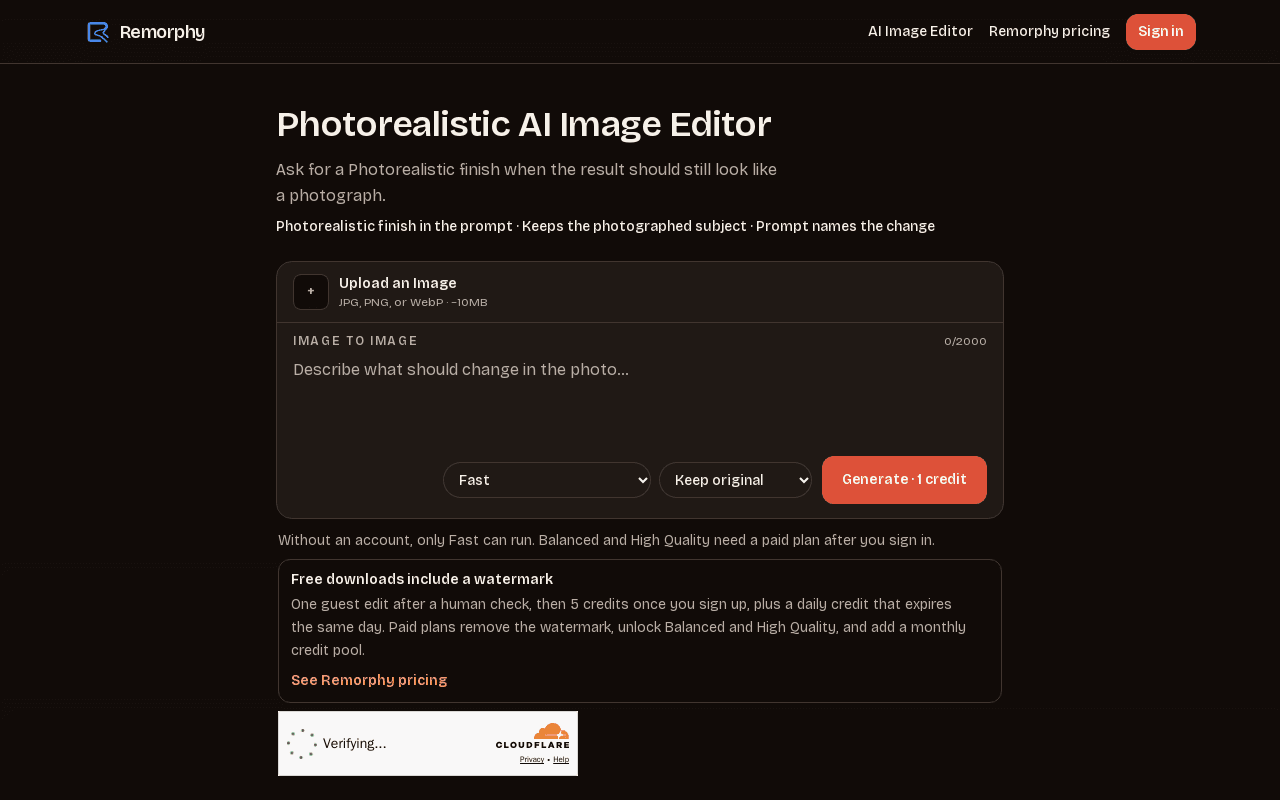
Remorphy is a web-based AI image editor focused on photorealistic edits that keep the subject of the photo you upload. You upload a JPG, PNG, or WebP file up to about 10MB, then describe the change in a prompt—lighting shifts, wardrobe color changes, background cleanup, or object removal. The editor has no style menu; the prompt wording decides whether the output reads as photographic, illustrated, painted, animated, or rendered. Face swaps involving real celebrities are refused on every plan, including the top tier.
The service runs on Flux models at three quality tiers: Fast (Klein 9B), Balanced (Klein 4B), and High Quality. Signed-out and free users stay on Fast with a watermark and one generation at a time. Paid plans unlock Balanced and High Quality, remove the watermark, add a priority queue, and allow two generations at once. Billing is monthly or yearly in US dollars, with yearly saving about 33% and still refilling the same monthly credit pool. One-time credit packs are available as a short top-up without changing the plan.
Screenshots
Commonly Cited Strengths & Limitations
Strengths
- Free tier with 5 starter credits plus a daily credit
- Preserves the subject of the uploaded photo rather than replacing it
- Yearly billing saves about 33% and still refills monthly credits
Limitations
- Free plan exports carry a watermark and run Fast only
- Monthly subscription credits do not roll over
- Face swaps of real celebrities are refused on every plan
Common Use Cases
- Match lighting and backdrop across product photos while keeping packaging text readable
- Convert a daytime exterior into a warmer dusk listing shot
- Replace wilted herbs or add gentle steam in food photography while keeping plate geometry
Details
- Pricing Model
- Freemium
- Starting Price
- From $8/month (Basic, billed yearly) or $12/month monthly
- Platforms
- Web
- Category
- AI Image & Video Generation
Who is Remorphy for?
E-commerce merchandising teams
Catalog managers who need consistent studio-style light across SKUs photographed on different days.
Real estate and interior photographers
Listing photographers who need twilight conversions or small background cleanup while keeping the property geometry stable.
Frequently Asked Questions
Is Remorphy free?
Remorphy offers a free plan, with paid plans starting at From $8/month (Basic, billed yearly) or $12/month monthly.
Does Remorphy have an API?
Remorphy does not currently offer a public API.
What platforms does Remorphy support?
Remorphy is available on Web.
What are the downsides of Remorphy?
Free plan exports carry a watermark and run Fast only Also, Monthly subscription credits do not roll over
Who is Remorphy best for?
Remorphy is best suited for E-commerce merchandising teams, Real estate and interior photographers.
What can I use Remorphy for?
Common uses for Remorphy include match lighting and backdrop across product photos while keeping packaging text readable, convert a daytime exterior into a warmer dusk listing shot, replace wilted herbs or add gentle steam in food photography while keeping plate geometry.
How does Remorphy compare to InfiniteArt.ai?
Remorphy and InfiniteArt.ai are both used for ai image & video generation -- specifically photo editing tools. See the full side-by-side comparison for pricing and feature differences.
Key Features
- Image-to-image editing from uploadUpload a JPG, PNG, or WebP photo up to about 10MB and describe the change in a prompt. The subject of the upload remains the subject of the result.
- Three Flux model tiersFast uses FLUX.2 Klein 9B, Balanced uses Klein 4B, and High Quality is unlocked on paid plans. Signed-out visits stay on Fast.
- Prompt-controlled finishThere is no style menu. Writing photorealistic, illustration, oil painting, anime, or 3D render in the prompt steers the output look.
- Watermark-free paid exportsFree and signed-out exports carry a Remorphy watermark. Paid plans export clean files.
- Priority queue and parallel jobsPaid plans join a priority queue and can run two generations at once; free runs one at a time.
- One-time credit packsPacks of 100 credits for $5 or 300 credits for $12 add to the balance without changing the plan.
Technical Details
- Free Plan
- Available
Official Pricing
Remorphy's published plans · verified Oct 30, 2026
Free
$0
- 5 credits once plus a daily credit
- Fast model only
- Watermark on exports
- One generation at a time
Basic
$12/month or $96/year/mo
- 300 credits each month
- No watermark
- Balanced and High Quality unlocked
- Priority queue, two generations at once
Pro
$29/month or $232/year/mo
- 750 credits each month
- No watermark
- Balanced and High Quality unlocked
- Priority queue, two generations at once
Ultra
$59/month or $472/year/mo
- 5,000 credits each month
- No watermark
- Balanced and High Quality unlocked
- Priority queue, two generations at once
100 credit pack
$5/one-time
- 100 credits added to balance
- Does not change plan
300 credit pack
$12/one-time
- 300 credits added to balance
- Does not change plan
Pricing shown above is sourced from Remorphy's own published plans as of Oct 30, 2026 and can change at any time -- confirm current pricing on Remorphy's own site before purchasing.
Full Remorphy pricing breakdown, free plan and cheaper alternatives →
Real Pricing from Verified Users
See what people actually pay for Remorphy
Reviews
0 reviews
No reviews yet. Be the first to share your experience!
Switching Stories
Real migration experiences with Remorphy
Discussion
Ask questions, share tips, or discuss this tool with other users.
No discussion yet. Start the conversation!
Similar tools in AI Image & Video Generation
Other listed tools in AI Image & Video Generation, not reviewed as direct alternatives

AI creative studio for iOS and Mac that turns text into images and animates them into video.
Also Photo Editing Tools
- Text-to-image generation
- Generate videos
- Multiple image models
AI headshot generator that turns your selfies into professional headshots in under 90 minutes.
Also Photo Editing Tools
- AI Headshot Generation
- AI Virtual Try-On
- Reprocessing
All-in-one browser AI platform for generating images, video, music, voice chat, and more.
Also Photo Editing Tools
- AI Image Generator
- AI Video Generator
- AI Music Generator

Turn your photos into anime-style portraits, or generate original anime art from text.
Also Photo Editing Tools
- Photo to Anime
- Text to Anime Generator
- Gender Selection
AI-generated diverse faces and full-body humans for ads, design, ML, and research.
Also Photo Editing Tools
- Faces
- Face Generator
- Humans

Free browser-based AI photo editor, image generator, and video maker powered by top AI models
Also Photo Editing Tools
- AI Image Generator
- AI Video Generator
- AI Face Swap
Also used for
People Also Viewed


More in AI Image & Video Generation

All-in-one audio & video editing


Open-source image generation AI