
PinMy App
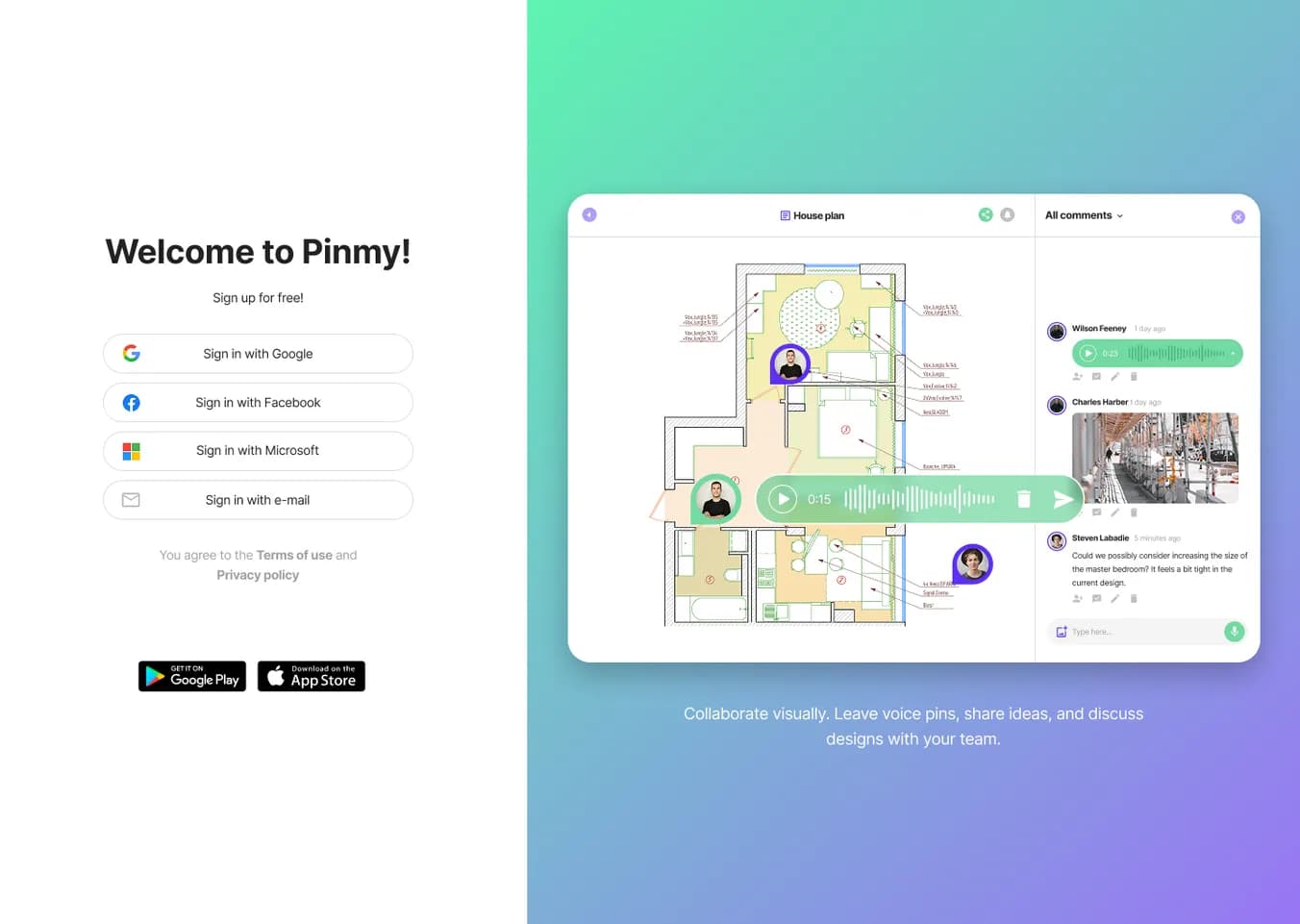
Pin construction defects to plans, photos, videos or 3D models — then export a PDF report on site.
Data verified Sep 26, 2026
Editorial Verdict
AI-researched, not hands-on testedPinMy App is field-first snagging software: instead of running through a project-management board, you drop a voice note, photo, or comment directly onto a PDF plan, site photo, walkthrough video, or 3D IFC model and export a PDF report from that file. That focus makes it a good fit for supervisors, foremen, and BIM coordinators who need to document defects on site with gloves and weak signal, and the BCF 2.1 support means issues can round-trip with Revit, Navisworks, or Solibri rather than staying siloed. The tradeoff is that it deliberately skips task management and Kanban workflows, so teams that want defects tracked to resolution will still need a separate tool. Also worth noting: users report the Safari experience isn't fully optimized and language support is limited, which may matter for web-primary or non-English teams.
Reviewed by AIToolPundit Editorial Team · last verified September 2026
About PinMy App
PinMy is a voice-first field documentation and snagging tool for construction teams — site supervisors, foremen, snagging leads and BIM coordinators — who capture defects by pinning a voice note, photo or text comment to the exact spot on a PDF plan, site photo, walkthrough video or 3D IFC model. Every pin becomes a structured record you can export as a PDF report straight from the file, with no task setup or Kanban board required. Unlike office-oriented project tools, it's built for glove-friendly, one-bar-of-signal site use and can exchange IFC issues with Revit, Navisworks or Solibri via BCF 2.1.
Screenshots
Commonly Cited Strengths & Limitations
Strengths
- Simple and easy to use
- Cross-platform access across iOS, Android and web
- Voice notes are easier than typing on site
Limitations
- Safari browser experience is not fully optimized
- Limited language support
Common Use Cases
- Pinning defects and snags to floor plans, photos or 3D models on site
- Exporting end-of-day PDF snag and defect reports straight from a file
- Exchanging IFC/BIM issues with Revit, Navisworks or Solibri via BCF
- Capturing voice-note documentation with automatic transcription
- Collaborating on visual feedback and markups across a team
- Reading serial plates and labels from site photos with OCR
Details
- Pricing Model
- Freemium
- Starting Price
- €8.99/mo
- Category
- Project Management
Who is PinMy App for?
Site Supervisors
Capture defects with a voice note and photo pinned to the exact spot, then export a report before leaving site.
BIM Coordinators
Annotate 3D IFC models and exchange issues with Revit, Navisworks or Solibri as BCF 2.1 files.
Snagging Managers
Pin, assign and track each defect until closed, then export the punch list as a PDF.
Frequently Asked Questions
Is PinMy App free?
PinMy App offers a free plan, with paid plans starting at €8.99/mo.
Does PinMy App have an API?
PinMy App does not currently offer a public API.
What does PinMy App integrate with?
PinMy App integrates with Revit, Navisworks, Solibri, BCF 2.1, IFC, Chrome extension.
Is PinMy App cloud-based or self-hosted?
PinMy App is offered as a cloud-based (SaaS) deployment.
What are the downsides of PinMy App?
Safari browser experience is not fully optimized Also, Limited language support
Who is PinMy App best for?
PinMy App is best suited for Site Supervisors, BIM Coordinators, Snagging Managers.
What can I use PinMy App for?
Common uses for PinMy App include pinning defects and snags to floor plans, photos or 3d models on site, exporting end-of-day pdf snag and defect reports straight from a file, exchanging ifc/bim issues with revit, navisworks or solibri via bcf, capturing voice-note documentation with automatic transcription.
What is the best alternative to PinMy App?
Suno AI is the closest alternative to PinMy App, followed by Notion and Asana.
How does PinMy App compare to Suno AI?
PinMy App and Suno AI are both used for project management -- specifically voice & speech tools. See the full side-by-side comparison for pricing and feature differences.
Key Features
- Voice notes on plansDrop a pin and speak; notes are transcribed automatically and made searchable.
- Pins on PDFs, photos and videosUse the same pinning workflow across every file type a team handles.
- 3D IFC model annotationPin defects and issues directly onto 3D IFC building models.
- OCR on site photosAutomatically read serial plates, labels and printed plans from photos (Premium).
- Video annotationPin comments to specific moments in walkthrough videos (Premium).
- Interactive global mapSee all projects geolocated and open any pin from anywhere.
- Threaded repliesReply to any comment in one chronological, never-nested feed.
- PDF report from any fileExport every pin and comment on a file to a PDF with no task setup (beta).
- Structured report modesStatus, open-only, done-only, per-assignee and daily-activity reports in a consistent layout (beta).
- BCF in / BCF outExchange IFC issues with Revit, Navisworks or Solibri as BCF 2.1 files (beta).
- Kanban board & assignmentsAssign pins and tasks with statuses to track defects until closed.
- Real-time collaborationTag teammates who open the same plan and see the same pin, voice note and photo.
- Precision pinningPins stay exactly where placed, keeping full context attached to the defect.
- Multi-language voice-to-textVoice transcription supports multiple languages for international teams.
Integrations
Technical Details
- Deployment
- Cloud
- Target Market
- B2B
- Free Plan
- Available
Support
Official Pricing
PinMy App's published plans · verified Sep 26, 2026
Free
$0
- No credit card required
- Manage up to 6 files
- Unlimited pins & comments
- Voice-to-text in multiple languages
Premium
€8.99/mo
- OCR on site photos
- Video annotation
Real Pricing from Verified Users
See what people actually pay for PinMy App
Reviews
0 reviews
No reviews yet. Be the first to share your experience!
Switching Stories
Real migration experiences with PinMy App
Discussion
Ask questions, share tips, or discuss this tool with other users.
No discussion yet. Start the conversation!

- Free AI music generator
- 10 free songs daily
- Granular creation controls

- Capture knowledge
- Find answers
- Automate busywork

- Asana Work Graph
- Multiplayer
- Shared memory
- Inbox
- Planner
- Automation

- AI agents
- Agent builder
- AI assistant

- Super Agents
- Brain² (AI)
- Deep Search
Also used for
People Also Viewed


More in Project Management
One app to replace them all

The issue tracker built for modern software teams
Scheduling automation for teams

Work OS that powers teams to run projects and workflows