
Taskeya
Run your agency. Connect projects, clients and invoices in one workspace.
Data verified Oct 30, 2026
Score
- Price
- From $20/month (Starter, 5 seats included)
- Try it free
- Free trial (14 days)
- Best for
- Marketing and service agencies
- Platforms
- Web, macOS, Windows, Android, Chrome extension, API
Editorial Verdict
AI-researched, not hands-on testedTaskeya is an agency management workspace that bundles project boards, client CRM, invoicing, HR, chat, forms, automations, and an AI assistant for marketing and service agencies. It suits small-to-mid agencies that want client projects and finance in one tool rather than stitching several apps together, and pricing is seat-bundled per plan instead of per user. One limitation is that even the Enterprise plan caps automations at 1,000 per month, and the iOS app is not yet shipped.
Reviewed by AIToolPundit Editorial Team · last verified October 2026
About Taskeya
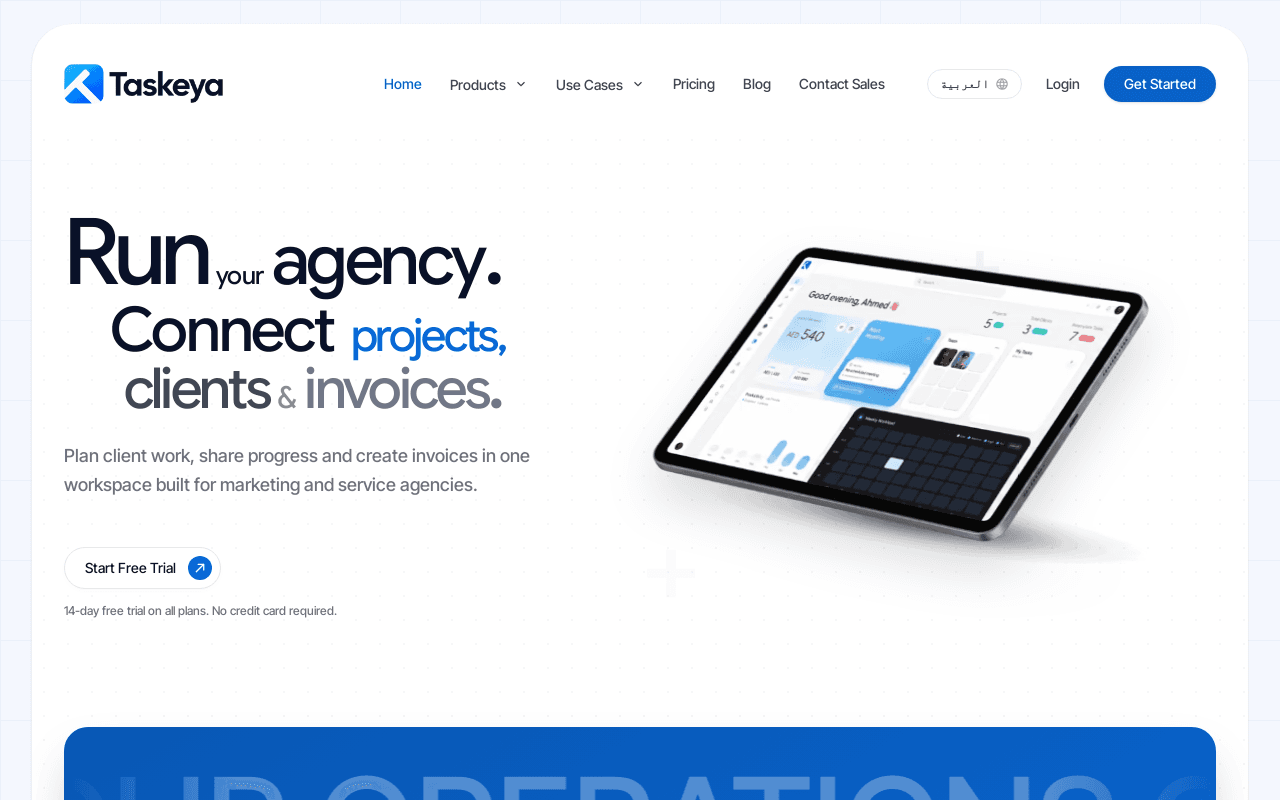
Taskeya is an agency management workspace that brings project boards, client CRM, invoicing, HR, team chat, forms, files, reports, and automations into a single tool aimed at marketing and service agencies. Project work can be organized on boards with Kanban, table, calendar, Gantt, timeline, workload, map, form, and analytics views, with task owners, due dates, priority, and files visible in list view.
The platform includes a client portal for sharing documents and progress, invoice creation with templates and recurring settings, expenses, payslips, and payroll settings, plus a Tasky AI assistant that drafts content, summarizes meetings, and generates project reports. Taskeya runs in the browser and on desktop (macOS and Windows), has an Android app and a Chrome extension, and connects to Slack, Google Workspace, Google Meet, and Google Drive Picker, with board API tokens, webhooks, an MCP connection, and a ChatGPT plugin.
Screenshots
Commonly Cited Strengths & Limitations
Strengths
- Combines project management, CRM, invoicing, HR, and chat in one workspace
- Flat seat-bundle pricing instead of per-user pricing
- 14-day free trial on all plans with no credit card required
Limitations
- Starter plan excludes white-label branding and caps Tasky AI at 1,000 messages per month
- Automations are capped at 1,000 per month even on the Enterprise plan
- iOS app is listed as coming soon
Common Use Cases
- Plan client deliverables on boards and share progress through a client portal
- Create and send branded invoices with recurring settings and share links
- Automate invoicing, time tracking, and HR workflows across the workspace
Details
- Pricing Model
- Free Trial
- Starting Price
- From $20/month (Starter, 5 seats included)
- Platforms
- WebmacOSWindowsAndroidChrome extensionAPI
- Category
- Project Management
Who is Taskeya for?
Marketing and service agencies
Agencies running client projects, invoicing, and team coordination together need a connected workspace for deliverables, portals, and billing.
Consultants and operations teams
Service teams and growing businesses that manage client work alongside internal HR, expenses, and documents in one place.
Frequently Asked Questions
How much does Taskeya cost?
Taskeya starts at From $20/month (Starter, 5 seats included) (Free Trial).
Does Taskeya offer a free trial?
Yes, Taskeya offers a free trial of 14 days.
Does Taskeya have an API?
Yes, Taskeya provides an API for developers.
What platforms does Taskeya support?
Taskeya is available on Web, macOS, Windows, Android, Chrome extension, API.
What are the downsides of Taskeya?
Starter plan excludes white-label branding and caps Tasky AI at 1,000 messages per month Also, Automations are capped at 1,000 per month even on the Enterprise plan
Who is Taskeya best for?
Taskeya is best suited for Marketing and service agencies, Consultants and operations teams.
What can I use Taskeya for?
Common uses for Taskeya include plan client deliverables on boards and share progress through a client portal, create and send branded invoices with recurring settings and share links, automate invoicing, time tracking, and hr workflows across the workspace.
How does Taskeya compare to Waplify?
Taskeya and Waplify are both used for project management -- specifically sales & crm tools. See the full side-by-side comparison for pricing and feature differences.
Key Features
- Project boards and multiple viewsOrganize deliverables with Kanban, table, calendar, Gantt, timeline, workload, map, form, and analytics views, with owners, due dates, priority, and files.
- Client CRM and client portalsManage client profiles, invite portal users, share files, and keep client-facing work separate from internal team discussions.
- Invoicing and financeBuild, style, send, print, and share invoices with templates, recurring settings, share links, expenses, payslips, and payroll settings.
- Tasky AI assistantIn-workspace AI that summarizes project activity, drafts documents and meeting minutes, and polishes writing.
- Workflow automationsTrigger-action automations for sending invoices, logging time tracking, tracking project expenses, and HR operations.
- Integrations and API accessConnects with Slack, Google Workspace, Google Meet, and Google Drive Picker, with board API tokens, webhooks, an MCP connection, and a ChatGPT plugin.
Technical Details
- API
- Available
- Free Trial
- 14 days
Official Pricing
Taskeya's published plans · verified Oct 30, 2026
Starter
$20/month/mo
- 5 seats included
- 100 projects, 100 automations, 10GB storage
- 10 invoices per month
- 1,000 Tasky AI messages/mo
Pro
$49/month/mo
- 20 seats included
- Unlimited projects, 1,000 automations, 100GB storage
- Unlimited invoices and Tasky AI
- White-label workspace branding
Enterprise
$99/month/mo
- 50 seats included
- Unlimited projects, 1,000 automations, 500GB storage
- Unlimited invoices and Tasky AI
- White-label workspace branding
Pricing shown above is sourced from Taskeya's own published plans as of Oct 30, 2026 and can change at any time -- confirm current pricing on Taskeya's own site before purchasing.
Full Taskeya pricing breakdown, free plan and cheaper alternatives →
Real Pricing from Verified Users
See what people actually pay for Taskeya
Reviews
0 reviews
No reviews yet. Be the first to share your experience!
Switching Stories
Real migration experiences with Taskeya
Discussion
Ask questions, share tips, or discuss this tool with other users.
No discussion yet. Start the conversation!
Similar tools in Project Management
Other listed tools in Project Management, not reviewed as direct alternatives
- Broadcasts
- Chatbot flow builder
- Shared team inbox

A minimal weekly planner and to-do app with a paper-like design for individuals and small teams.
Also Project Management Tools
- Weekly view planner
- Cross-device sync
- Recurring task management

- Find Clients / Co-pilot
- WARP Mode
- AI Sales Agents
AI sales coaching and meeting intelligence that records calls, updates your CRM, and drafts follow-ups.
Also Sales & CRM Tools
- Omnichannel call capture
- AI summary & transcription
- Automatic CRM updates

AI workspace for docs, notes, wikis and selling subscriptions
Also Project Management Tools
- Docs, notes and wikis
- AI credits
- Sell subscriptions on pages
AI suite for sales and support conversations on WhatsApp and other messaging channels
Also Sales & CRM Tools
- Omnichannel team inbox
- AI agents
- Automation flow builder
People Also Viewed


More in Project Management
One app to replace them all

The issue tracker built for modern software teams
Scheduling automation for teams

Work OS that powers teams to run projects and workflows